TP-Link Deco M4 AC1200 Whole Home Mesh Wi-Fi System | Pack of 3

DECOM43PK
£ 119
shopping_cart

Add to cart

WISHLIST

Delivery to

Nearest store with stock
storefront

Collect from

Description

Fast. Stable. Everywhere

Whole Home Mesh Wi-Fi System, AC1200 Dual-Band Wi-Fi

Experience Wi-Fi Like Never Before

Deco M4 uses TP-Link Mesh technology to cover your entire home in powerful Wi-Fi. Multiple units seamlessly work together to create a home network like nothing you’ve ever experienced.

Wi-Fi Dead-Zone Killer

Deco M4 is the simplest way to guarantee a strong Wi-Fi signal in every corner of your home up to 4,000 square feet (3-pack). Wireless connections and optional Ethernet backhaul work together to link Deco units, providing even faster network speeds and truly seamless coverage.


Want more coverage? Simply add another Deco.

Ranch-Style Home

2.4 GHz wireless connection

Multi-Story Home

5 GHz wireless connection

L-Shaped Home

Optional Gigabit Ethernet Backhaul

Check out the video:
Seamless Roaming with One Wi-Fi Name

TP-Link Mesh means Deco units work together to form one unified network. Your phone or tablet automatically connects to the fastest Deco as you move through your home, creating a truly seamless Wi-Fi experience.

Engineered for More Devices

Engineered for

More Devices

Deco products are aimed to dramatically improve capacity and efficiency in traffic-dense environments. No matter how many screens or devices are on at once, everyone is able to enjoy a more efficient network that loads faster without dragging down performance.†

  • Connections for up to 100 device
  • Web browsing
  • Smart home devices
  • 720P Streaming
  • IP Camera streaming
  • 1080P Streaming
  • High-Speed downloading
  • 4K Streaming
  • Phones and tablets
2-in-1 Router and Access Point Modes

Flexible and multifunctional, the Deco M4 includes a variety of features allowing it to serve as a router or access point. Just choose the mode for your actual network demands and experience the maximum wireless flexibility.
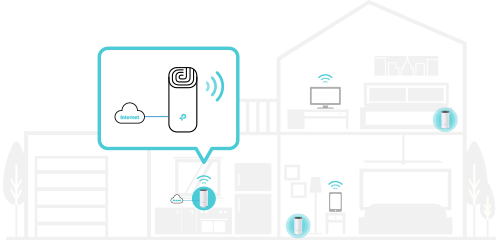
Router (Default)

Instantly generate a private wireless network.
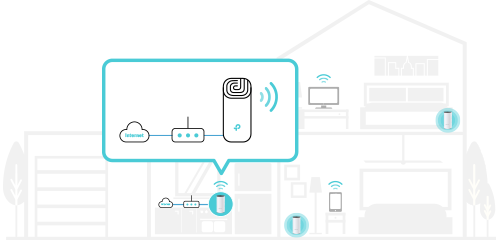
Access Point

Create Wi-Fi access for any Wi-Fi Made Easyexisting wired network.

Wi-Fi Made Easy: App-Based Setup

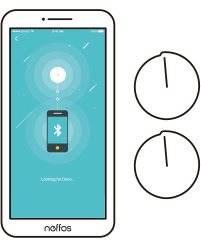
Installing Deco M4 is fast and easy. Just unpack the system, download the Deco app and follow its onscreen directions.

Easy Management

Manage your Wi-Fi at home or away in the Deco app, including seeing the connected devices, prioritizing your devices, setting up a guest network and more.

Voice Control

Pair with Alexa to control Deco M4 with simple voice commands. Enjoy the convenient life.

Robust Parental Controls

Simple, intuitive parental controls make it easy to


keep your children safe while they’re online.

User Profiles

Easily create a profile for each family member and set custom time limits and online time allowances.

Filter Levels

Keep your family safe online with one-touch security settings that block websites based on age-appropriateness.

Time Limits

Set limits on how much time each person in your family can spend online.

Insights

Check out which sites your children visit and how much time they spend on each to ensure your children are safe while they’re having fun online.

Suspend Connectivity

Take a break from Wi-Fi for dinner and family game nights. Just tap a button to suspend internet access for everyone in your home.

All Decos Can Work Together

Deco M4 is compatible with every other Deco model to form a Mesh network. Expand Mesh Wi-Fi coverage anytime by simply adding more Decos.

Setup and App
Deco Network Management at Your Fingertips

The Deco app provides the easiest way to set up, manage and monitor your Deco Whole Home Mesh Wi-Fi System through your iOS or Android devices.
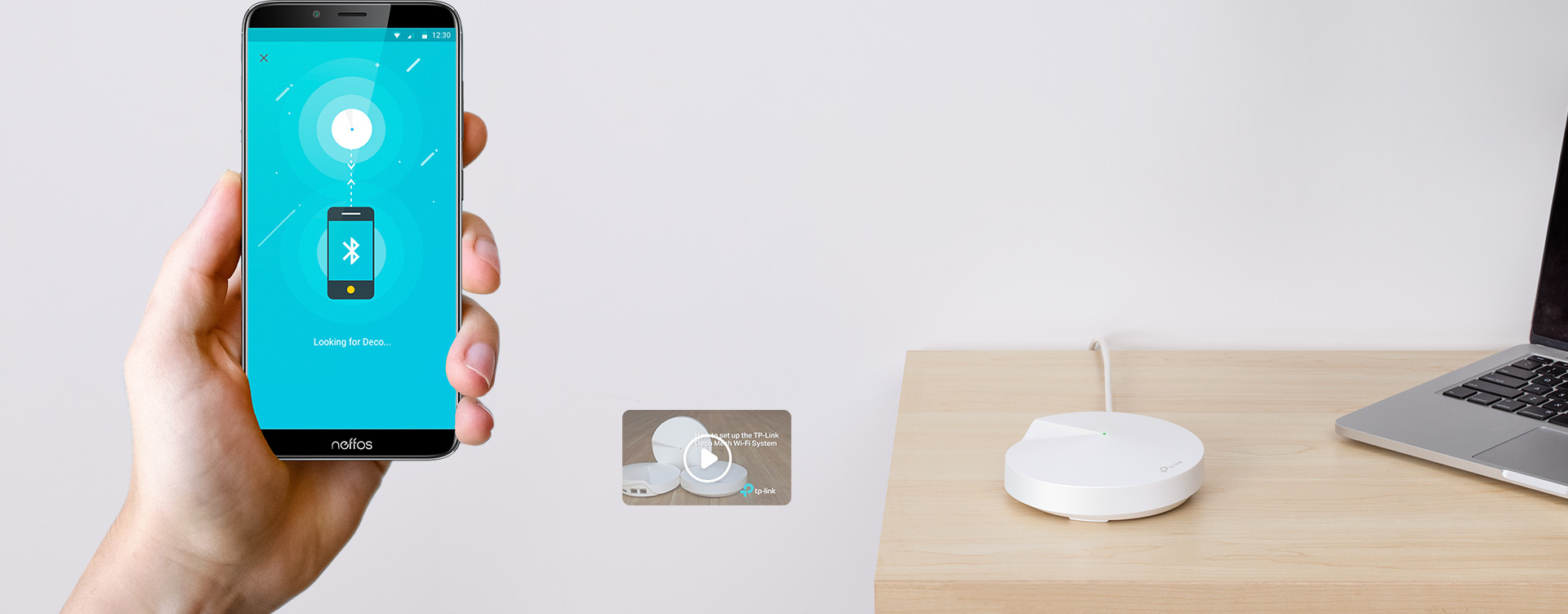
Setup Just Got a Lot Easier

Unbox Deco, install the app and then simply follow the on-screen directions. Deco app will take care of the rest and get your network up and running in minutes.
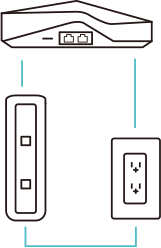
  • Connect Deco to your cable modem and turn on both devices

  • Download and launch the Deco app
  • Follow the in-app instructions to configure your Deco system.
  • Simple Management

    Deco makes it easy to manage your Wi-Fi from anywhere, whether you’re on the couch, at work, or anywhere in between.

    Simple Management Dashboard

    View the working status of your network, check the connected devices and get all the features your router offers.

    Check the Connected Devices

    View a list of your connected devices with the ability to pause and resume internet access, test the internet speed and prioritize or block the devices.

    Multiple Decos, One App

    The Deco app manages all your Deco networks and devices connected to your Deco Wi-Fi.

    Remote Management

    Remotely take control of the network with a tap of your phone - no matter where you find yourself.

    Powerful Parental Controls

    Simple, intuitive parental controls make it easy to keep your children safe while they’re online.

    User Profiles

    Easily create a profile for each family member and set custom time limits and online time allowances. Assign devices to profiles so rules extend to individual devices as well as family members.

    Filter Levels

    Keep your family safe online with one-touch security settings that block content based on age-appropriateness.

    Time Limits

    Set limits on how much time each person in your family can spend online.

    Insights

    With Insights, you can check out which sites your children visit and how much time they spend on each. It’s a great way to know your children are safe while they’re having fun online.

    Suspend Connectivity

    Take a break from Wi-Fi for dinner and family game nights. Just tap a button to suspend internet access for everyone in your home.

    An Intuitive App Full of Features: Monthly Usage Summary

    See a comprehensive list of your network details every month, including usage, blocked content, security threats and more.
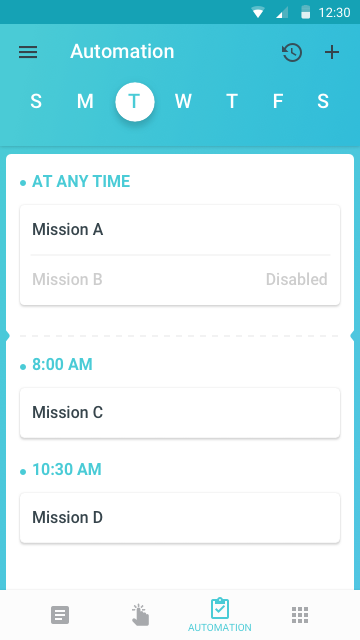
    Home Automation

    Make your life easy with powerful automation and voice control tools.

    *Currently only for Deco M9 Plus
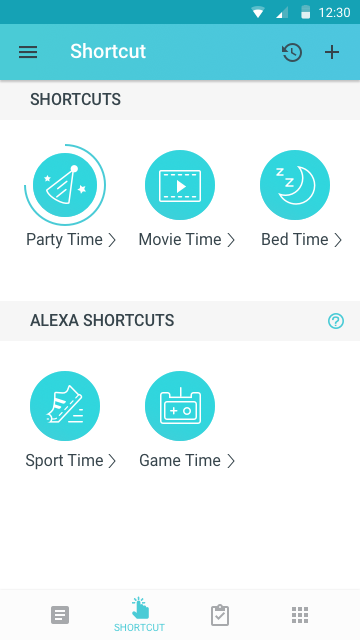
    Flexible Shortcut

    Flexibly control all devices from your phone or tablet with just one click.
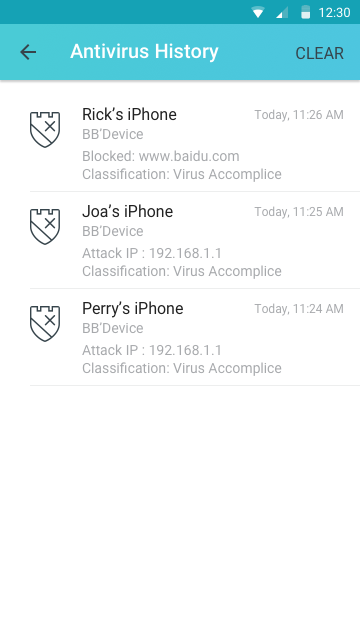
    Protect Your Network

    Built-in Antivirus helps you defend against malicious website and guard your online payment.

    *Currently only for Deco M9 Plus, Deco P7 and Deco M5
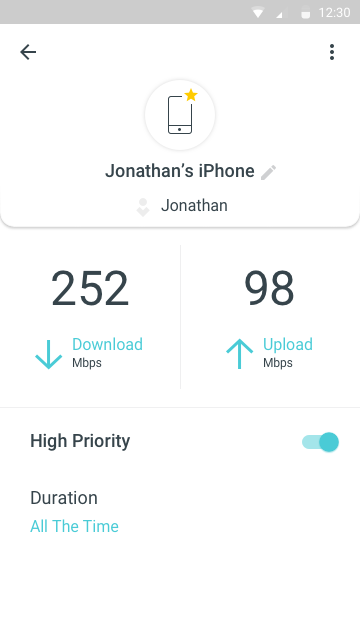
    Prioritize Your Devices

    Choose which devices always have the fastest connections or set priority for a specific time duration.
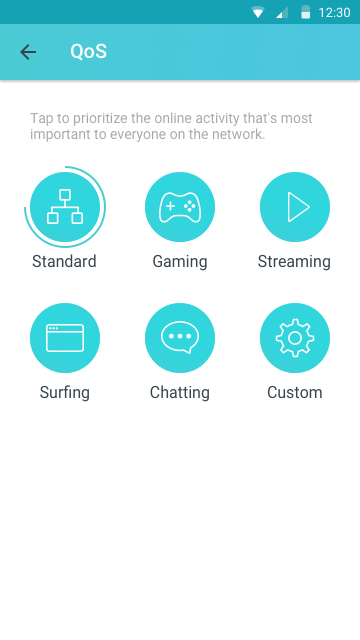
    Set Application Priorities

    Allocate more bandwidth for the activities most important to you with simple controls.

    *Currently only for Deco M9 Plus, Deco P7 and Deco M5
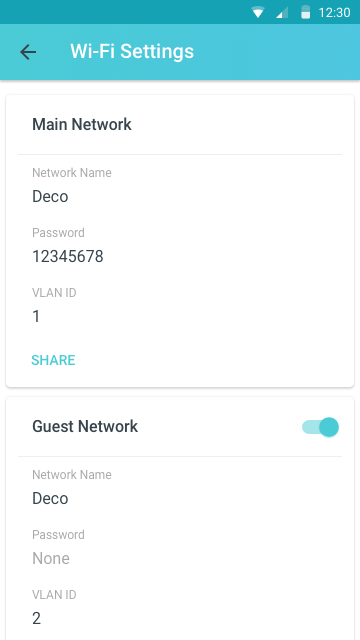
    Share Wi-Fi with Friends

    Set up separate Wi-Fi profiles for guests and share the password to

    make it easier for them to hop online.
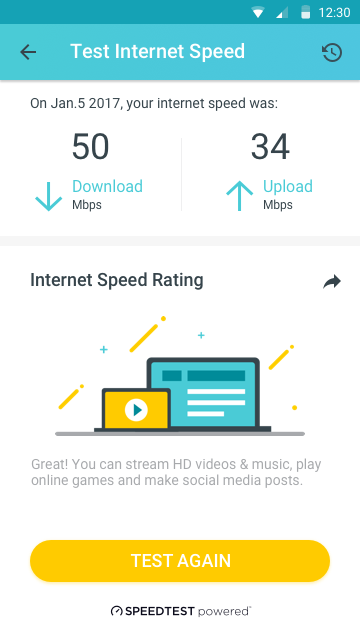
    Check Your Speed

    Run a speed test to ensure you’re getting the internet speeds you’re paying for.


    View every device on your network and see how much bandwidth they’re using.

    TP-link Support Always has Your Back

    Have questions about Deco? Help is always just a click away. Find the answers in Deco app and don’t hesitate to contact us with just a simple click.

    Wireless:
    Standards: Wi-Fi 6
    • IEEE 802.11ax/ac/n/a 5 GHz
    • IEEE 802.11ax/n/b/g 2.4 GHz
    Wi-Fi Speeds
    AX1200
    • 5 GHz: 867 Mbps (802.11ac)
    • 2.4 GHz: 300 Mbps (802.11n)
    Wi-Fi Range
    3-5 Bedroom Houses (3-pack)

    TP-Link Mesh Technology:

    • Optional Ethernet backhaul work together to link Deco units to provide seamless coverage

    2× Antennas (Internal):

    • Multiple antennas form a signal-boosting array to cover more directions and large areas

    Beamforming:

    • Concentrates wireless signal strength towards clients to expand WiFi range
    Wi-Fi Capacity
    Medium

    Dual-Band:

    • Distribute devices to different bands for optimal performance
    • MU-MIMO:
    • Simultaneously communicates with multiple MU-MIMO clients
    • OFDMA:
    • Simultaneously communicates with multiple WiFi 6 clients
    • Working Modes
    • Router mode: Access point mode
    Hardware:
    • Button: Reset button, Ethernet ports: 2× Gigabit ports
    *Per Deco Unit
    • Supports WAN/LAN auto-sensing
    Security:
    Network Security
    • SPI firewall, Access control
    Guest Network
    • 1× 5 GHz guest network, 1× 2.4 GHz guest network
    Software:
    Protocols
    • IPv4, Pv6
    WAN Types
    • Dynamic IP, Static IP, PPPoE, PPTP, L2TP
    Quality of Service
    Home Shield QoS
    • QoS by device
    Cloud Service
    • OTA firmware upgrade
    • TP-Link ID
    • DDNS
    NAT forwarding
    • Port forwarding, UPnP
    IPTV
    • IGMP proxy, IGMP Snooping, Bridge, Tag VLAN
    DHCP
    • Address reservation
    • DHCP client list
    • Server
    • DDNS: TP-Link
    • Management: Deco app
    Others:
    • System requirements: Android 5.0 or later, iOS 9.0 or later
    • Certifications: CE, FCC, IC, NCC, BSMI, IDA, RCM, JPA, JRF, VCCI, KC, RoHS
    Environment
    • Operating temperature: 0 °C~40 °C (32 °F~104 °F)
    • Storage temperature: -40 °C~70 °C (-40 °F~158 °F)
    • Operating humidity: 10%~90% non-condensing
    • Storage humidity: 5%~90% non-condensing
    Test Data:
    Wi-Fi transmission power
    • CE: <20 dBm (2.4 GHz), <23 dBm (5 GHz)
    • FCC: <30 dBm

    *1. Maximum wireless transmission rates are the physical rates derived from IEEE Standard 802.11 specifications. Range, coverage, and maximum quantity of connected devices are based on test results under normal usage conditions. Actual wireless data throughput. wireless coverage, and quantity of connected devices are not guaranteed and will vary as a result of 1) environmental factors, including building materials, physical objects, and obstacles, 2) network conditions, including local interference, volume and density of traffic, product location, network complexity, and network overhead, and 3) client limitations, including rated performance, location, connection quality, and client condition.

    What's in the Box:
    • 3 Deco M4R units
    • 1 RJ45 ethernet cable
    • 3 Power adapters
    Product Features:
    • Deco uses a system of units to achieve seamless whole-home Wi-Fi coverage — eliminate weak signal areas once and for all!
    • With advanced Deco Mesh Technology, units work together to form a unified network with a single network name. Devices automatically switch between Decos as you move through your home for the fastest possible speeds
    • A Deco M4 three-pack delivers Wi-Fi to an area of up to 4,000 square feet (EU version). And if that’s not enough, simply add more Decos to the network anytime to increase coverage
    • Deco M4 provides fast and stable connections with speeds of up to 1167 Mbps and works with major internet service provider (ISP) and modem
    • Deco can handle traffic from even the busiest of networks, providing lag-free connections for up to 100 devices
    • Parental Controls limits online time and block inappropriate websites according to unique profiles created for each family member
    • Setup is easier than ever with the Deco app there to walk you through every step

    Specs

    General

    • Brand TP-Link
    • Product Category Internet Extenders
    • Product Type Wi-Fi System

    Extender Features

    • Additional Features DHCP Server,

    Modems & Router Features

    • Firewall Type SPI Firewall
    • LAN/WAN Auto Sensing

    Networking Features

    • Antenna 2x Internal Antennas
    • Antenna Form Factor Internal
    • Antenna Form Factor Dual Band
    • Connectivity Technology Wireless
    • Interface Ethernet, WAN, LAN, Wi-Fi 5
    • Wireless Speed 867 Mbps

    USB Wi-Fi Adapaters Features

    • Encryption WPA, WPA2

    Dimensions

    • Width 90.7 mm
    • Depth 90.7 mm
    • Height 190 mm

    Warranty

    • Warranty 36 Months

    Delivery

    To see our Christmas Delivery schedule, click here!

    We offer a comprehensive nationwide (excluding Republic of Ireland) delivery service; we aim to deliver all orders as quickly as possible.

    Item Type Delivered In Delivered By
    Small Items 2 Working days DPD
    Large Electrical Appliance 3-5 Working days Independent transport company
    Furniture & Bedding 3-5 Working days Independent transport company

    Please note: if you have ordered furniture and bedding products that involve a lead time, are customised or made to measure, we will contact you to discuss delivery.

    Free Click & Collect In Store

    Can't wait for delivery or don't want to pay additional delivery charges? It's incredibly simple to collect your online order in store and get your hands on your product quickly and easily. Simply select the Click & Collect option and head to your nearest Harvey Norman store to collect your order.

    1. During checkout, select “Click & Collect” and select your preferred store.
    2. After your order is placed, you will receive an order acknowledgement email with your order number.
    3. Once the store has confirmed your order and reserved the stock, you will receive an email to inform you that your order is "Ready for collection". If you want to use "Contactless Click & Collect" select this option on this email. Please Note: Some large items are held in an off-site warehouse. We will notify you of the collection location in your Ready for Pickup email.
    4. Bring your order number to the store you selected for Click & Collect, along with photo ID and the credit card you used to make the order.
    5. Speak to one of our staff and your order should be processed in minutes.
    6. If availing of Contactless Click & Collect, please click the link in your email "ready to pick up" to let the store know you are on your way. When you have parked in the designated parking bay, open your email, and choose the "I'm here" option and a member of staff will bring your purchase out to your car.

    Easy returns

    Store Purchases: For all items purchased from a physical store, please return to your local Harvey Norman Store. Please see Terms & Conditions here.

    Online Purchases: For all items purchased via our Online Store (website), please fill out our Contact Form where our team can guide you through the process.

    Description

    keyboard_arrow_down

    Description

    Fast. Stable. Everywhere

    Whole Home Mesh Wi-Fi System, AC1200 Dual-Band Wi-Fi

    Experience Wi-Fi Like Never Before

    Deco M4 uses TP-Link Mesh technology to cover your entire home in powerful Wi-Fi. Multiple units seamlessly work together to create a home network like nothing you’ve ever experienced.

    Wi-Fi Dead-Zone Killer

    Deco M4 is the simplest way to guarantee a strong Wi-Fi signal in every corner of your home up to 4,000 square feet (3-pack). Wireless connections and optional Ethernet backhaul work together to link Deco units, providing even faster network speeds and truly seamless coverage.


    Want more coverage? Simply add another Deco.

    Ranch-Style Home

    2.4 GHz wireless connection

    Multi-Story Home

    5 GHz wireless connection

    L-Shaped Home

    Optional Gigabit Ethernet Backhaul

    Check out the video:
    Check out the video:
    Seamless Roaming with One Wi-Fi Name

    TP-Link Mesh means Deco units work together to form one unified network. Your phone or tablet automatically connects to the fastest Deco as you move through your home, creating a truly seamless Wi-Fi experience.

    Engineered for More Devices

    Engineered for

    More Devices

    Deco products are aimed to dramatically improve capacity and efficiency in traffic-dense environments. No matter how many screens or devices are on at once, everyone is able to enjoy a more efficient network that loads faster without dragging down performance.†

    • Connections for up to 100 device
    • Web browsing
    • Smart home devices
    • 720P Streaming
    • IP Camera streaming
    • 1080P Streaming
    • High-Speed downloading
    • 4K Streaming
    • Phones and tablets
    2-in-1 Router and Access Point Modes

    Flexible and multifunctional, the Deco M4 includes a variety of features allowing it to serve as a router or access point. Just choose the mode for your actual network demands and experience the maximum wireless flexibility.

    Router (Default)

    Instantly generate a private wireless network.

    Access Point

    Create Wi-Fi access for any Wi-Fi Made Easyexisting wired network.

    Wi-Fi Made Easy: App-Based Setup

    Installing Deco M4 is fast and easy. Just unpack the system, download the Deco app and follow its onscreen directions.

    Easy Management

    Manage your Wi-Fi at home or away in the Deco app, including seeing the connected devices, prioritizing your devices, setting up a guest network and more.

    Voice Control

    Pair with Alexa to control Deco M4 with simple voice commands. Enjoy the convenient life.

    Robust Parental Controls

    Simple, intuitive parental controls make it easy to


    keep your children safe while they’re online.

    User Profiles

    Easily create a profile for each family member and set custom time limits and online time allowances.

    Filter Levels

    Keep your family safe online with one-touch security settings that block websites based on age-appropriateness.

    Time Limits

    Set limits on how much time each person in your family can spend online.

    Insights

    Check out which sites your children visit and how much time they spend on each to ensure your children are safe while they’re having fun online.

    Suspend Connectivity

    Take a break from Wi-Fi for dinner and family game nights. Just tap a button to suspend internet access for everyone in your home.

    All Decos Can Work Together

    Deco M4 is compatible with every other Deco model to form a Mesh network. Expand Mesh Wi-Fi coverage anytime by simply adding more Decos.

    Setup and App
    Deco Network Management at Your Fingertips

    The Deco app provides the easiest way to set up, manage and monitor your Deco Whole Home Mesh Wi-Fi System through your iOS or Android devices.

    Setup Just Got a Lot Easier

    Unbox Deco, install the app and then simply follow the on-screen directions. Deco app will take care of the rest and get your network up and running in minutes.

  • Connect Deco to your cable modem and turn on both devices
  • Download and launch the Deco app
  • Follow the in-app instructions to configure your Deco system.
  • Simple Management

    Deco makes it easy to manage your Wi-Fi from anywhere, whether you’re on the couch, at work, or anywhere in between.

    Simple Management Dashboard

    View the working status of your network, check the connected devices and get all the features your router offers.

    Check the Connected Devices

    View a list of your connected devices with the ability to pause and resume internet access, test the internet speed and prioritize or block the devices.

    Multiple Decos, One App

    The Deco app manages all your Deco networks and devices connected to your Deco Wi-Fi.

    Remote Management

    Remotely take control of the network with a tap of your phone - no matter where you find yourself.

    Powerful Parental Controls

    Simple, intuitive parental controls make it easy to keep your children safe while they’re online.

    User Profiles

    Easily create a profile for each family member and set custom time limits and online time allowances. Assign devices to profiles so rules extend to individual devices as well as family members.

    Filter Levels

    Keep your family safe online with one-touch security settings that block content based on age-appropriateness.

    Time Limits

    Set limits on how much time each person in your family can spend online.

    Insights

    With Insights, you can check out which sites your children visit and how much time they spend on each. It’s a great way to know your children are safe while they’re having fun online.

    Suspend Connectivity

    Take a break from Wi-Fi for dinner and family game nights. Just tap a button to suspend internet access for everyone in your home.

    An Intuitive App Full of Features: Monthly Usage Summary

    See a comprehensive list of your network details every month, including usage, blocked content, security threats and more.

    Home Automation

    Make your life easy with powerful automation and voice control tools.

    *Currently only for Deco M9 Plus

    Flexible Shortcut

    Flexibly control all devices from your phone or tablet with just one click.

    Protect Your Network

    Built-in Antivirus helps you defend against malicious website and guard your online payment.

    *Currently only for Deco M9 Plus, Deco P7 and Deco M5

    Prioritize Your Devices

    Choose which devices always have the fastest connections or set priority for a specific time duration.

    Set Application Priorities

    Allocate more bandwidth for the activities most important to you with simple controls.

    *Currently only for Deco M9 Plus, Deco P7 and Deco M5

    Share Wi-Fi with Friends

    Set up separate Wi-Fi profiles for guests and share the password to

    make it easier for them to hop online.

    Check Your Speed

    Run a speed test to ensure you’re getting the internet speeds you’re paying for.


    View every device on your network and see how much bandwidth they’re using.

    TP-link Support Always has Your Back

    Have questions about Deco? Help is always just a click away. Find the answers in Deco app and don’t hesitate to contact us with just a simple click.

    Wireless:
    Standards: Wi-Fi 6
    • IEEE 802.11ax/ac/n/a 5 GHz
    • IEEE 802.11ax/n/b/g 2.4 GHz
    Wi-Fi Speeds
    AX1200
    • 5 GHz: 867 Mbps (802.11ac)
    • 2.4 GHz: 300 Mbps (802.11n)
    Wi-Fi Range
    3-5 Bedroom Houses (3-pack)

    TP-Link Mesh Technology:

    • Optional Ethernet backhaul work together to link Deco units to provide seamless coverage

    2× Antennas (Internal):

    • Multiple antennas form a signal-boosting array to cover more directions and large areas

    Beamforming:

    • Concentrates wireless signal strength towards clients to expand WiFi range
    Wi-Fi Capacity
    Medium

    Dual-Band:

    • Distribute devices to different bands for optimal performance
    • MU-MIMO:
    • Simultaneously communicates with multiple MU-MIMO clients
    • OFDMA:
    • Simultaneously communicates with multiple WiFi 6 clients
    • Working Modes
    • Router mode: Access point mode
    Hardware:
    • Button: Reset button, Ethernet ports: 2× Gigabit ports
    *Per Deco Unit
    • Supports WAN/LAN auto-sensing
    Security:
    Network Security
    • SPI firewall, Access control
    Guest Network
    • 1× 5 GHz guest network, 1× 2.4 GHz guest network
    Software:
    Protocols
    • IPv4, Pv6
    WAN Types
    • Dynamic IP, Static IP, PPPoE, PPTP, L2TP
    Quality of Service
    Home Shield QoS
    • QoS by device
    Cloud Service
    • OTA firmware upgrade
    • TP-Link ID
    • DDNS
    NAT forwarding
    • Port forwarding, UPnP
    IPTV
    • IGMP proxy, IGMP Snooping, Bridge, Tag VLAN
    DHCP
    • Address reservation
    • DHCP client list
    • Server
    • DDNS: TP-Link
    • Management: Deco app
    Others:
    • System requirements: Android 5.0 or later, iOS 9.0 or later
    • Certifications: CE, FCC, IC, NCC, BSMI, IDA, RCM, JPA, JRF, VCCI, KC, RoHS
    Environment
    • Operating temperature: 0 °C~40 °C (32 °F~104 °F)
    • Storage temperature: -40 °C~70 °C (-40 °F~158 °F)
    • Operating humidity: 10%~90% non-condensing
    • Storage humidity: 5%~90% non-condensing
    Test Data:
    Wi-Fi transmission power
    • CE: <20 dBm (2.4 GHz), <23 dBm (5 GHz)
    • FCC: <30 dBm

    *1. Maximum wireless transmission rates are the physical rates derived from IEEE Standard 802.11 specifications. Range, coverage, and maximum quantity of connected devices are based on test results under normal usage conditions. Actual wireless data throughput. wireless coverage, and quantity of connected devices are not guaranteed and will vary as a result of 1) environmental factors, including building materials, physical objects, and obstacles, 2) network conditions, including local interference, volume and density of traffic, product location, network complexity, and network overhead, and 3) client limitations, including rated performance, location, connection quality, and client condition.

    What's in the Box:
    • 3 Deco M4R units
    • 1 RJ45 ethernet cable
    • 3 Power adapters
    Product Features:
    • Deco uses a system of units to achieve seamless whole-home Wi-Fi coverage — eliminate weak signal areas once and for all!
    • With advanced Deco Mesh Technology, units work together to form a unified network with a single network name. Devices automatically switch between Decos as you move through your home for the fastest possible speeds
    • A Deco M4 three-pack delivers Wi-Fi to an area of up to 4,000 square feet (EU version). And if that’s not enough, simply add more Decos to the network anytime to increase coverage
    • Deco M4 provides fast and stable connections with speeds of up to 1167 Mbps and works with major internet service provider (ISP) and modem
    • Deco can handle traffic from even the busiest of networks, providing lag-free connections for up to 100 devices
    • Parental Controls limits online time and block inappropriate websites according to unique profiles created for each family member
    • Setup is easier than ever with the Deco app there to walk you through every step

    Specifications

    keyboard_arrow_down

    Specs

    General

    • Brand TP-Link
    • Product Category Internet Extenders
    • Product Type Wi-Fi System

    Extender Features

    • Additional Features DHCP Server,

    Modems & Router Features

    • Firewall Type SPI Firewall
    • LAN/WAN Auto Sensing

    Networking Features

    • Antenna 2x Internal Antennas
    • Antenna Form Factor Internal
    • Antenna Form Factor Dual Band
    • Connectivity Technology Wireless
    • Interface Ethernet, WAN, LAN, Wi-Fi 5
    • Wireless Speed 867 Mbps

    USB Wi-Fi Adapaters Features

    • Encryption WPA, WPA2

    Dimensions

    • Width 90.7 mm
    • Depth 90.7 mm
    • Height 190 mm

    Warranty

    • Warranty 36 Months

    Delivery & Returns

    keyboard_arrow_down

    Delivery

    To see our Christmas Delivery schedule, click here!

    We offer a comprehensive nationwide (excluding Republic of Ireland) delivery service; we aim to deliver all orders as quickly as possible.

    Item Type Delivered In Delivered By
    Small Items 2 Working days DPD
    Large Electrical Appliance 3-5 Working days Independent transport company
    Furniture & Bedding 3-5 Working days Independent transport company

    Please note: if you have ordered furniture and bedding products that involve a lead time, are customised or made to measure, we will contact you to discuss delivery.

    Free Click & Collect In Store

    Can't wait for delivery or don't want to pay additional delivery charges? It's incredibly simple to collect your online order in store and get your hands on your product quickly and easily. Simply select the Click & Collect option and head to your nearest Harvey Norman store to collect your order.

    1. During checkout, select “Click & Collect” and select your preferred store.
    2. After your order is placed, you will receive an order acknowledgement email with your order number.
    3. Once the store has confirmed your order and reserved the stock, you will receive an email to inform you that your order is "Ready for collection". If you want to use "Contactless Click & Collect" select this option on this email. Please Note: Some large items are held in an off-site warehouse. We will notify you of the collection location in your Ready for Pickup email.
    4. Bring your order number to the store you selected for Click & Collect, along with photo ID and the credit card you used to make the order.
    5. Speak to one of our staff and your order should be processed in minutes.
    6. If availing of Contactless Click & Collect, please click the link in your email "ready to pick up" to let the store know you are on your way. When you have parked in the designated parking bay, open your email, and choose the "I'm here" option and a member of staff will bring your purchase out to your car.

    Easy returns

    Store Purchases: For all items purchased from a physical store, please return to your local Harvey Norman Store. Please see Terms & Conditions here.

    Online Purchases: For all items purchased via our Online Store (website), please fill out our Contact Form where our team can guide you through the process.

    Reviews

    keyboard_arrow_down

    You may also like

    £ 119

    Recently viewed