



interest free payments of
Late fees apply.
Terms and Conditions
By selecting a Brightcover policy you have agreed to purchase a policy which is underwritten and
provided by AWP P&C S.A. registered in France with ID No 519490080 RCS Paris Registered Office 7
Rue Dora Maar, 93400 Saint-Ouen, France acting through its UK Branch, AWP P&C (UK Branch), part
of the Allianz Group registered in the United Kingdom. Registered Branch No. BR015275. Authorised
by the Prudential Regulation Authority. Subject to regulation by the Financial Conduct Authority and
limited regulation by the Prudential Regulation Authority. Financial Services Register No. 534384.
Details about the extent of its regulation by the Prudential Regulation Authority are available on
request from AWP P&C (UK Branch)
Brightcover policies are made available to you on behalf of AWP P&C S.A. by Harvey Norman Trading (UK) Limited, trading as Harvey Norman, company number 15512318.
Brightcover policies are administered by IC Frith Service Contracts Limited. Company number 15543908. Authorised and regulated by the Financial Conduct Authority with Firm Reference Number: 1014736. Administration services are also provided by Frith Service Contracts Limited, who is an appointed representative of IC Frith Service Contracts Limited, with Financial Conduct Authority Firm Number 1025657.
Harvey Norman does not provide any advice or recommendations about the Brightcover insurance policy, nor will it search for and propose other suitable policies. You may find an alternative, equivalent or more suitable insurance policies elsewhere.
By ticking the box below you confirm you have read the Insurance Product Information Document (IPID) and agree to the Terms and Conditions (T&Cs) of Brightcover or Brightcover Mobile cover which includes details of your rights to cancellation, cooling off period, complaints procedure and privacy notice and that Brightcover or Brightcover Mobile meets your demands and needs.
Please read the Terms and Conditions and IPID that apply here: Brightcover T&Cs | Brightcover IPID | Brightcover Mobile T&Cs | Brightcover Mobile IPID
Delivery to
Delivery
Collect from
Click & Collect
Collect in store
Nearest store with stock
Nearest store with stock

Available services
Description
Take a ZV-1 II Tour
The ZV-1 II is an ideal all-round vlog camera. Compact and portable, it features a wide-angle zoom lens for versatile framing, a 1.0-type image sensor for great image quality, and an intelligent microphone for clear audio recording.
Check out the video:
Designed for Vloggers: Features to Elevate Your Vlogging

Frame It All
With the vlog camera ZV-1 II, you can shoot everything from group selfies to sprawling cityscapes. The wide-angle 18 mm [1]lens can capture a wider field of view than the human eye, so you can easily fit everyone or everything in the frame. Whether you're indoors or out, the wide-angle lens turns everyday scenes into dynamic footage.
1.35mm format equivalent when shooting still images. Slightly cropped in Active mode.
Versatile Framing
The ZV-1 II lets you frame your shots exactly how you want, thanks to its wide-angle zoom lens. 18 mm is great for selfies, while 50 mm is ideal for portraits and snapshots. What's more, the maximum apertures of F1.8 with the wide-angle and F4 with the telephoto give a smooth background bokeh, adding all the atmosphere you need.

Creative Colours
No experience is needed to make an impressive vlog with all the right visuals from the outset. My Image Style [2] lets you simply tweak brightness and colour while viewing what you plan to shoot - all without having to wade through menus. For shots with more creative colour and mood, Creative Look offers ten presets so simply select one that matches your vision.
2.In the Intelligent Auto or Scene Selection mode.Check out the video:
Add a Dramatic Touch
Just tap the screen to turn everyday moments into cinematic imagery, all without post-production editing. With the Cinematic Vlog Setting,[3] the camera automatically shoots in a Cinemascope aspect ratio[4] at 24 fps[5] — the film industry standard. You can also change the colour of your footage simply by selecting from five LOOKs and four MOODs for instant, professional results.
3. Available in “Movie” mode and “S&Q” mode only. Proxy recording is deactivated.4.The image (excluding the bars) is in CinemaScope aspect ratio (2.35:1), but the recorded image is 16:9.
5. The actual corresponding frame rate is 23.98 fps.
Check out the video:
Built-in Mic for Clear Voice Recording
In [Auto] mode, the new built-in Intelligent 3-Capsule Mic switches[6] the direction of the built-in mic from [All Directions] to [Front] when the camera recognises a human face in the frame. Or you can switch manually to [Front] for selfies or [Rear] when shooting with narration. Attach a supplied windscreen to reduce wind noise and capture clearer audio outdoors.
Creative Freedom: Compact & Easy to Use

Effortlessly Portable
Small and lightweight, the vlog camera ZV-1 II is designed to be taken out anywhere - just like your smartphone. Weighing just 292 g, capture everyday life with ease and grab content on the go.

Simple, Intuitive Control
Even first-time vloggers can jump straight into shooting with the ZV-1 II; there’s no need to study complex settings. Touch function icons like recording and self-timer are displayed on the screen for easy control. These are also great for shooting selfies or in other situations when you can’t reach the physical buttons on the camera.

Focus on You
The ZV-1 II automatically makes sure you always stay in focus with Touch Tracking. It recognises human faces and eyes, so it keeps track of the main subject without wandering off. Just tap the subject on the screen to activate the feature. Eye AF can even be set to track animal faces and eyes.
Data Usage Responsibility
The face registration feature involves the use of biometric data. You are responsible for your collection and use of such data, and compliance with applicable local law. For more details, please visit the website below.
Check out the video:
Powerful Image Stabilisation
Shaky footage can ruin the best of vlogs, but the ZV-1 II is built to let you capture great footage even while you’re walking and shooting handheld. Active Mode helps to minimise camera blur, giving you steadier shots without the need for any post-shoot editing.

Stand Out with Just a Tap
The ZV-1 II is designed for easier content creation. Activate the Product Showcase Setting and the camera will automatically focus on the product you're holding with no additional gestures needed. Or use Bokeh Switch to get a softly blurred background - simply select [Defocus] to make the subject stand out, or [Clear] to keep the entire image in focus.
Optimised for Selfies

Selfies Made Simple
Let the ZV-1 II work for you to capture great group moments. When taking selfies in iAUTO mode with two or three people, the camera automatically adjusts the setting to keep everyone’s faces sharp and clear.

Always Look Your Best
Look your best any time you're shooting. Without any special settings, the ZV-1 II accurately captures your skin tone, ensuring a healthy and natural look. Face Priority AE automatically brightens your face so there's no need to worry about lighting either. There's also a Soft Skin Effect selectable to OFF/ Low/ Mid /High to adjust your skin smoothness.

Always Know When You’re Recording
Say goodbye to accidentally missing the action. When you press the MOVIE button or tap the record icon on the LCD screen, the recording lamp glows red and a red frame appears on the screen, letting you know instantly that you're capturing what counts. The rotatable screen means you can also track recording while shooting from any angle.

Shooting Grip for Easy Vlogging
Vlogging is simpler and more comfortable with the optional GP-VPT2BT wireless shooting grip [4], which enables you to grab more stable shots and also doubles as a tripod. The zoom lever and recording button are on the grip side, so you don’t have to stretch around the camera every time to reach key control buttons.
4. Sold separately.
Share and Connect: Simple Smartphone Connection
Connecting your camera and smartphone has never been easier thanks to the Creators’ App mobile application. Data transfers continue in the background even if the smartphone display sleeps or a different app is launched. You can also turn your smartphone or PC into a remote control to operate the camera from a distance.

Simple Streaming with a Single Cable
Transform the ZV-1 II into a high-quality web camera just by connecting a compatible device via USB. The large 1.0-type image sensor and Creative Look presets ensure vibrant visuals.

Sony'S Cloud Services
Log in to the Creators' Cloud to make the most of Sony production support tools. This gives you access to cloud services like Master Cut (Beta), which uses camera metadata and cloud AI to efficiently create rough movie edits, saving you valuable time. Or use Ci Media Cloud to make team collaboration on production simpler and smoother.
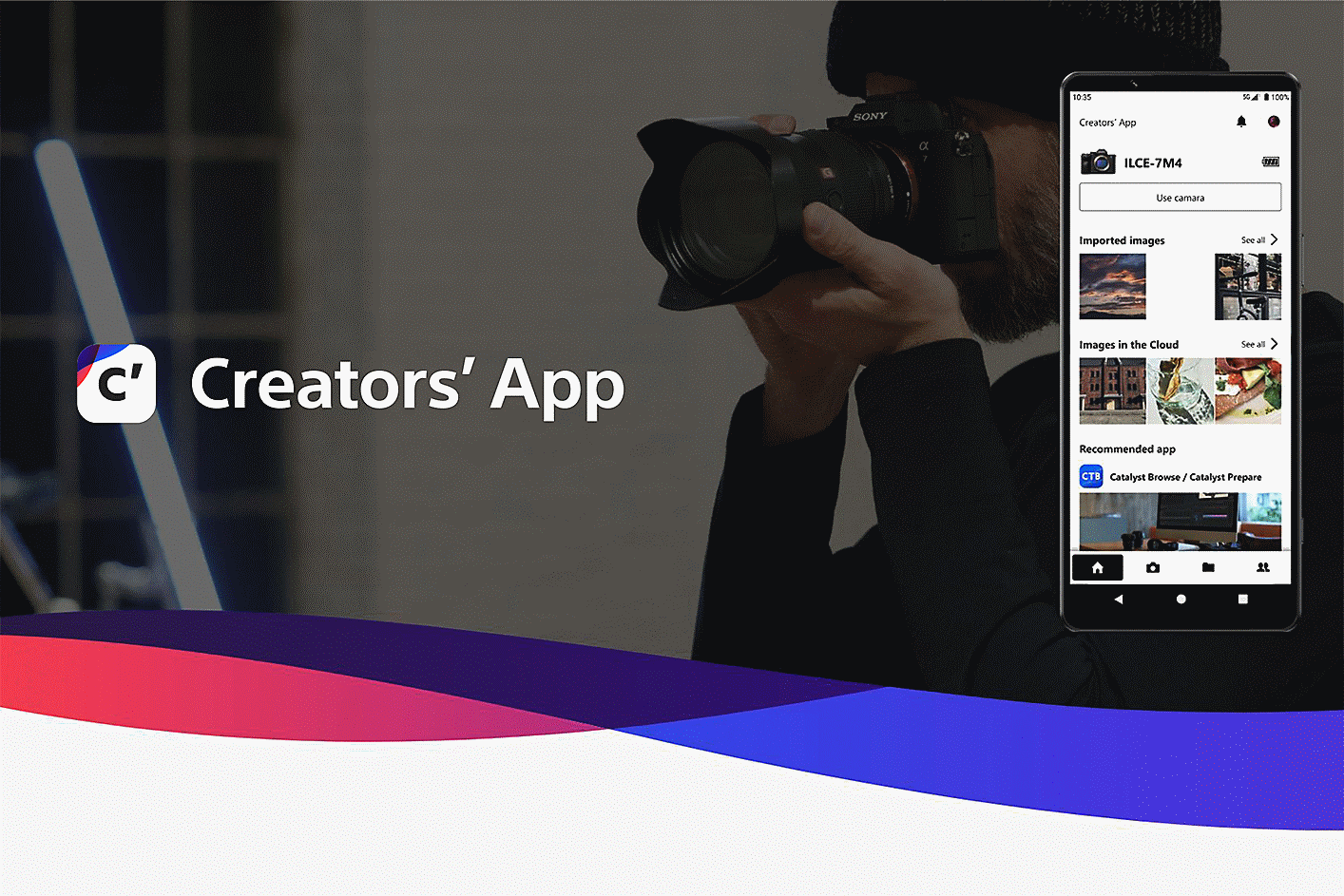
Creators' App
Creators' App is a smartphone application that allows you to connect your Sony camera to the cloud, enhancing functionality and convenience for shooting and sharing.

Advanced Features: High Quality Imagery
The ZV-1 II packs powerful specs in its compact body, offering impressive image quality. Its large 1.0-type image sensor means it can capture professional-level footage, shooting in XAVC S format up to 30p and in 4K, and up to 120p1 in Full HD for up to 5x slow motion. It also supports simultaneous proxy recording for efficient post-production workflow.

Grows with Your Creativity
With the ZV-1 II, it’s easy to take the next steps towards boosting your videography skills. Just like professional Cinema Line or α series cameras, the ZV-1 II supports S-Log and S-Gamut3.Cine picture profiles, giving you even greater flexibility for post-production.

Built-In ND Filter
The ZEISS Vario-Sonnar T* 18-50mm F1.8-4 zoom lens has a built-in neutral density (ND) filter to control light exposure by three stops, giving images greater expressiveness in bright light. The lens maintains sharpness throughout the zoom range, allowing you to take capture all the shots you need to bring your vlog to life.

Next Level Audio Quality
Raise your vlog audio quality even further by connecting external microphones. For example, the ECM-G1 clearly captures sound in front of the camera and can be attached without a cable. Or take your pick from Sony’s extensive line-up, designed to suit a broad range of applications[5].
5. Please check the compatibility info for compatible microphones.Towards a Better Future: Reducing Environmental footprint

Road to Zero
Inspired by the beauty of the world, Sony is doing its part to help preserve the Earth, while still allowing creators to produce even more beautiful and creative imagery. With a goal of achieving a zero environmental footprint across the entire Sony Group by the year 2040, Sony are accelerating numerous initiatives for the environment.

Non-Plastic Outer Packaging
The outer packaging of the ZV-1 II does not contain plastic, but instead uses Sony’s Original Blended Material, consisting of bamboo, sugar cane, and recycled paper. This unique blend not only produces high quality and durable packaging, but it is also recyclable for an even lower environmental impact.

Recyclable Non-Plastic Packaging Materials
Sony is working towards the use of non-plastic packaging materials, while still providing ample protection during shipping. Sony are also using plant-based non-woven fabrics for product bags. All of this helps to minimise environmental impact.

Using Recycled Plastic
SORPLAS is a Sony-developed durable and repeatedly recycled material. Sony use it in conjunction with other recycled materials to manufacture camera bodies without compromising performance and functionality. Approximately 379 tons of virgin plastic have been replaced by recycled plastics in Sony digital cameras and digital video cameras over the past ten years.

Wind Screen Using Recycled Polyester
The fibres used in the wind screen provided with the ZV-1 II are made exclusively from recycled PET bottles. Extensive testing was carried out to ensure that sound quality and wind noise reduction performance were fully up to Sony standards, achieving environmental impact reduction without compromising functionality.
Vlogging for Everyone
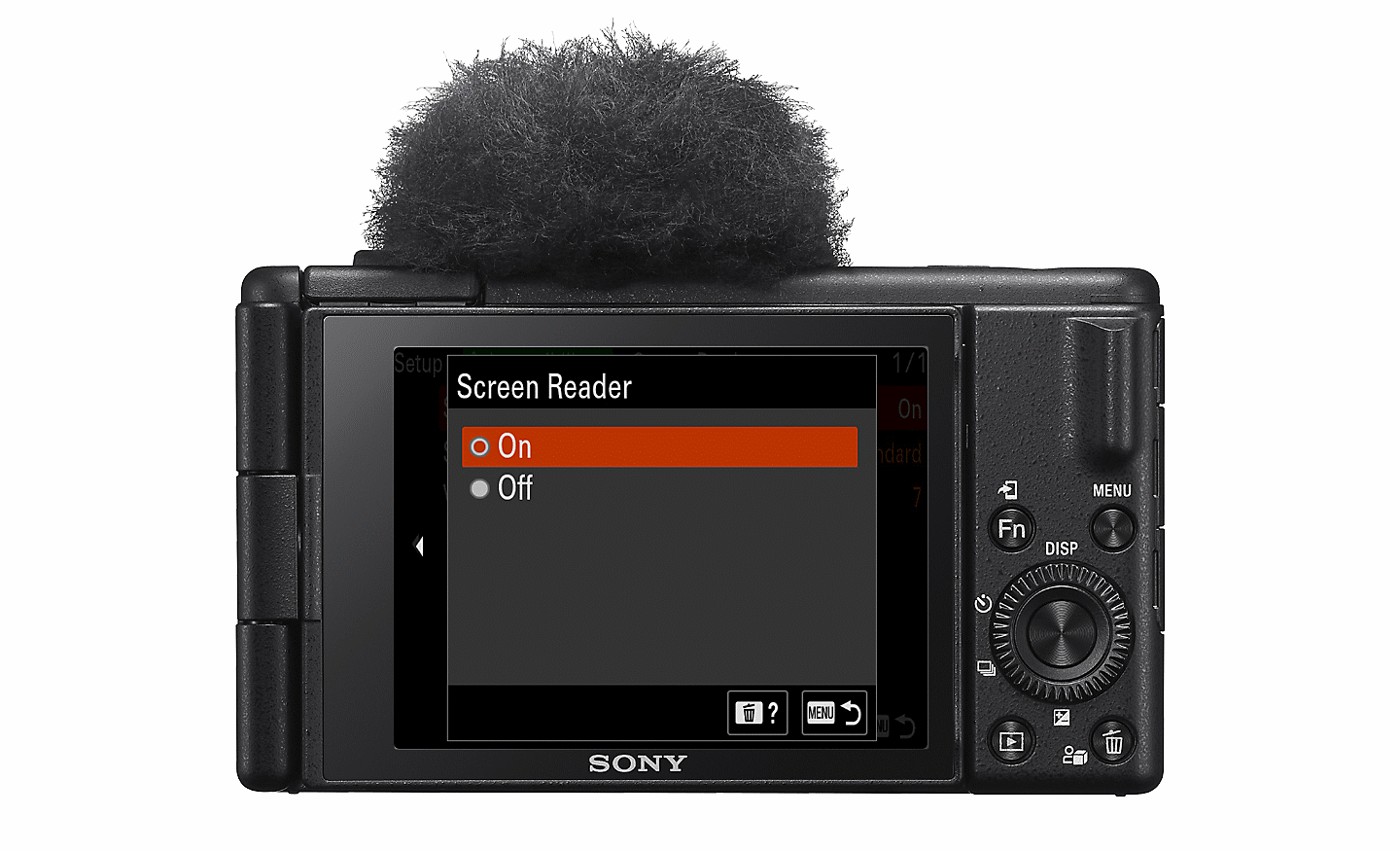
Enhanced Accessibility with Screen Reader
The screen reader function[6] enables text on menu screens to be read aloud. It's easy to activate by navigating to the [Setup] tab and turning the [Screen Reader] function ON. Screen reader volume can be adjusted via the [Sound Options] settings.
6. Availability varies depending on region and language.
Assistive Technology on Sony's Cameras
Sony's cameras include visual and mobility accessible technology.
What's in the Box:
- Rechargeable battery NP-BX1
- Wind screen
- Wind screen adaptor
Product Features:
- Versatile 18-50 mm wide-angle zoom lens ideal for vlogging
- Large 1.0-type image sensor for impressive image quality
- Built-In intelligent 3-capsule mic and supplied wind screen for clear voice recording
- Touch operation, bokeh switch, and the product showcase setting for vlogging with ease
- 292 g lightweight design for great portability and creative freedom
Specs
General
- Brand Sony
- Product Category Vlogging Cameras
- Product Type Vlogging Camera
- Product Colour Black
- Product Specific Colour Black
Camera Features
- Special Features Built-in, stereo, Built-in, monaural
- Audio File Formats LPCM 2ch (48 kHz 16 bit)
- Camera Resolution 21.0 MP
- Camera Type Digital camera
- Exposure Compensation +/- 3.0 EV (1/3 EV steps)
- Sensor Size CMOS
- Memory Card Type Memory Stick Duo/SD Memory Card
Display
- Screen Type LCD
- Touch Screen Yes
Lens Features
- Focus Type Fast Hybrid AF (phase-detection AF / contrast-detection AF)
Camera Functions
- Continuous Shooting 24 fps
- ISO Sensitivity 12800
- Shutter Speed 1/32000 - 1/4 s
- Type of Modes RAW, RAW+JPEG, JPEG
Photo Features
- Image Sizes (pixels) 1.0-type L: 5472 x 3648 (20 M), M: 3888 x 2592 (10 M), S: 2736 x 1824 (5.0 M)
Video Features
- Video File Formats MJPEG
Battery & Power
- Power Source Battery
- Battery Life 75 Minutes
Dimensions
- Width 105.5 mm
- Depth 46.7 mm
- Height 60.0 mm
- Weight 0.266 kg
Delivery
We offer a comprehensive nationwide (excluding Republic of Ireland) delivery service; we aim to deliver all orders as quickly as possible.
| Item Type | Delivered In | Delivered By |
|---|---|---|
| Small Items | 2 Working days | DPD |
| Large Electrical Appliance | 3-5 Working days | Independent transport company |
| Furniture & Bedding | 3-5 Working days | Independent transport company |
Please note: if you have ordered furniture and bedding products that involve a lead time, are customised or made to measure, we will contact you to discuss delivery. Delivery of large items outside mainland UK is subject to availability and may be restricted in some areas.
Free Click & Collect In Store
Can't wait for delivery or don't want to pay additional delivery charges? It's incredibly simple to collect your online order in store and get your hands on your product quickly and easily. Simply select the Click & Collect option and head to your nearest Harvey Norman store to collect your order.
- During checkout, select “Click & Collect” and select your preferred store.
- After your order is placed, you will receive an order acknowledgement email with your order number.
- Once the store has confirmed your order and reserved the stock, you will receive an email to inform you that your order is "Ready for collection". If you want to use "Contactless Click & Collect" select this option on this email. Please Note: Some large items are held in an off-site warehouse. We will notify you of the collection location in your Ready for Pickup email.
- Bring your order number to the store you selected for Click & Collect, along with photo ID and the credit card you used to make the order.
- Speak to one of our staff and your order should be processed in minutes.
- If availing of Contactless Click & Collect, please click the link in your email "ready to pick up" to let the store know you are on your way. When you have parked in the designated parking bay, open your email, and choose the "I'm here" option and a member of staff will bring your purchase out to your car.
Easy returns
Store Purchases: For all items purchased from a physical store, please return to your local Harvey Norman Store. Please see Terms & Conditions here.
Online Purchases: For all items purchased via our Online Store (website), please fill out our Contact Form where our team can guide you through the process.
Description
Description
Take a ZV-1 II Tour
The ZV-1 II is an ideal all-round vlog camera. Compact and portable, it features a wide-angle zoom lens for versatile framing, a 1.0-type image sensor for great image quality, and an intelligent microphone for clear audio recording.
Check out the video:
Designed for Vloggers: Features to Elevate Your Vlogging
Frame It All
With the vlog camera ZV-1 II, you can shoot everything from group selfies to sprawling cityscapes. The wide-angle 18 mm [1]lens can capture a wider field of view than the human eye, so you can easily fit everyone or everything in the frame. Whether you're indoors or out, the wide-angle lens turns everyday scenes into dynamic footage.
1.35mm format equivalent when shooting still images. Slightly cropped in Active mode.
Versatile Framing
The ZV-1 II lets you frame your shots exactly how you want, thanks to its wide-angle zoom lens. 18 mm is great for selfies, while 50 mm is ideal for portraits and snapshots. What's more, the maximum apertures of F1.8 with the wide-angle and F4 with the telephoto give a smooth background bokeh, adding all the atmosphere you need.
Creative Colours
No experience is needed to make an impressive vlog with all the right visuals from the outset. My Image Style [2] lets you simply tweak brightness and colour while viewing what you plan to shoot - all without having to wade through menus. For shots with more creative colour and mood, Creative Look offers ten presets so simply select one that matches your vision.
2.In the Intelligent Auto or Scene Selection mode.Check out the video:
Add a Dramatic Touch
Just tap the screen to turn everyday moments into cinematic imagery, all without post-production editing. With the Cinematic Vlog Setting,[3] the camera automatically shoots in a Cinemascope aspect ratio[4] at 24 fps[5] — the film industry standard. You can also change the colour of your footage simply by selecting from five LOOKs and four MOODs for instant, professional results.
3. Available in “Movie” mode and “S&Q” mode only. Proxy recording is deactivated.4.The image (excluding the bars) is in CinemaScope aspect ratio (2.35:1), but the recorded image is 16:9.
5. The actual corresponding frame rate is 23.98 fps.
Check out the video:
Built-in Mic for Clear Voice Recording
In [Auto] mode, the new built-in Intelligent 3-Capsule Mic switches[6] the direction of the built-in mic from [All Directions] to [Front] when the camera recognises a human face in the frame. Or you can switch manually to [Front] for selfies or [Rear] when shooting with narration. Attach a supplied windscreen to reduce wind noise and capture clearer audio outdoors.
Creative Freedom: Compact & Easy to Use
Effortlessly Portable
Small and lightweight, the vlog camera ZV-1 II is designed to be taken out anywhere - just like your smartphone. Weighing just 292 g, capture everyday life with ease and grab content on the go.
Simple, Intuitive Control
Even first-time vloggers can jump straight into shooting with the ZV-1 II; there’s no need to study complex settings. Touch function icons like recording and self-timer are displayed on the screen for easy control. These are also great for shooting selfies or in other situations when you can’t reach the physical buttons on the camera.
Focus on You
The ZV-1 II automatically makes sure you always stay in focus with Touch Tracking. It recognises human faces and eyes, so it keeps track of the main subject without wandering off. Just tap the subject on the screen to activate the feature. Eye AF can even be set to track animal faces and eyes.
Data Usage Responsibility
The face registration feature involves the use of biometric data. You are responsible for your collection and use of such data, and compliance with applicable local law. For more details, please visit the website below.
Check out the video:
Powerful Image Stabilisation
Shaky footage can ruin the best of vlogs, but the ZV-1 II is built to let you capture great footage even while you’re walking and shooting handheld. Active Mode helps to minimise camera blur, giving you steadier shots without the need for any post-shoot editing.
Stand Out with Just a Tap
The ZV-1 II is designed for easier content creation. Activate the Product Showcase Setting and the camera will automatically focus on the product you're holding with no additional gestures needed. Or use Bokeh Switch to get a softly blurred background - simply select [Defocus] to make the subject stand out, or [Clear] to keep the entire image in focus.
Optimised for Selfies
Selfies Made Simple
Let the ZV-1 II work for you to capture great group moments. When taking selfies in iAUTO mode with two or three people, the camera automatically adjusts the setting to keep everyone’s faces sharp and clear.
Always Look Your Best
Look your best any time you're shooting. Without any special settings, the ZV-1 II accurately captures your skin tone, ensuring a healthy and natural look. Face Priority AE automatically brightens your face so there's no need to worry about lighting either. There's also a Soft Skin Effect selectable to OFF/ Low/ Mid /High to adjust your skin smoothness.
Always Know When You’re Recording
Say goodbye to accidentally missing the action. When you press the MOVIE button or tap the record icon on the LCD screen, the recording lamp glows red and a red frame appears on the screen, letting you know instantly that you're capturing what counts. The rotatable screen means you can also track recording while shooting from any angle.
Shooting Grip for Easy Vlogging
Vlogging is simpler and more comfortable with the optional GP-VPT2BT wireless shooting grip [4], which enables you to grab more stable shots and also doubles as a tripod. The zoom lever and recording button are on the grip side, so you don’t have to stretch around the camera every time to reach key control buttons.
4. Sold separately.
Share and Connect: Simple Smartphone Connection
Connecting your camera and smartphone has never been easier thanks to the Creators’ App mobile application. Data transfers continue in the background even if the smartphone display sleeps or a different app is launched. You can also turn your smartphone or PC into a remote control to operate the camera from a distance.
Simple Streaming with a Single Cable
Transform the ZV-1 II into a high-quality web camera just by connecting a compatible device via USB. The large 1.0-type image sensor and Creative Look presets ensure vibrant visuals.
Sony'S Cloud Services
Log in to the Creators' Cloud to make the most of Sony production support tools. This gives you access to cloud services like Master Cut (Beta), which uses camera metadata and cloud AI to efficiently create rough movie edits, saving you valuable time. Or use Ci Media Cloud to make team collaboration on production simpler and smoother.
Creators' App
Creators' App is a smartphone application that allows you to connect your Sony camera to the cloud, enhancing functionality and convenience for shooting and sharing.
Advanced Features: High Quality Imagery
The ZV-1 II packs powerful specs in its compact body, offering impressive image quality. Its large 1.0-type image sensor means it can capture professional-level footage, shooting in XAVC S format up to 30p and in 4K, and up to 120p1 in Full HD for up to 5x slow motion. It also supports simultaneous proxy recording for efficient post-production workflow.
Grows with Your Creativity
With the ZV-1 II, it’s easy to take the next steps towards boosting your videography skills. Just like professional Cinema Line or α series cameras, the ZV-1 II supports S-Log and S-Gamut3.Cine picture profiles, giving you even greater flexibility for post-production.
Built-In ND Filter
The ZEISS Vario-Sonnar T* 18-50mm F1.8-4 zoom lens has a built-in neutral density (ND) filter to control light exposure by three stops, giving images greater expressiveness in bright light. The lens maintains sharpness throughout the zoom range, allowing you to take capture all the shots you need to bring your vlog to life.
Next Level Audio Quality
Raise your vlog audio quality even further by connecting external microphones. For example, the ECM-G1 clearly captures sound in front of the camera and can be attached without a cable. Or take your pick from Sony’s extensive line-up, designed to suit a broad range of applications[5].
5. Please check the compatibility info for compatible microphones.Towards a Better Future: Reducing Environmental footprint
Road to Zero
Inspired by the beauty of the world, Sony is doing its part to help preserve the Earth, while still allowing creators to produce even more beautiful and creative imagery. With a goal of achieving a zero environmental footprint across the entire Sony Group by the year 2040, Sony are accelerating numerous initiatives for the environment.
Non-Plastic Outer Packaging
The outer packaging of the ZV-1 II does not contain plastic, but instead uses Sony’s Original Blended Material, consisting of bamboo, sugar cane, and recycled paper. This unique blend not only produces high quality and durable packaging, but it is also recyclable for an even lower environmental impact.
Recyclable Non-Plastic Packaging Materials
Sony is working towards the use of non-plastic packaging materials, while still providing ample protection during shipping. Sony are also using plant-based non-woven fabrics for product bags. All of this helps to minimise environmental impact.
Using Recycled Plastic
SORPLAS is a Sony-developed durable and repeatedly recycled material. Sony use it in conjunction with other recycled materials to manufacture camera bodies without compromising performance and functionality. Approximately 379 tons of virgin plastic have been replaced by recycled plastics in Sony digital cameras and digital video cameras over the past ten years.
Wind Screen Using Recycled Polyester
The fibres used in the wind screen provided with the ZV-1 II are made exclusively from recycled PET bottles. Extensive testing was carried out to ensure that sound quality and wind noise reduction performance were fully up to Sony standards, achieving environmental impact reduction without compromising functionality.
Vlogging for Everyone
Enhanced Accessibility with Screen Reader
The screen reader function[6] enables text on menu screens to be read aloud. It's easy to activate by navigating to the [Setup] tab and turning the [Screen Reader] function ON. Screen reader volume can be adjusted via the [Sound Options] settings.
6. Availability varies depending on region and language.Assistive Technology on Sony's Cameras
Sony's cameras include visual and mobility accessible technology.
What's in the Box:
- Rechargeable battery NP-BX1
- Wind screen
- Wind screen adaptor
Product Features:
- Versatile 18-50 mm wide-angle zoom lens ideal for vlogging
- Large 1.0-type image sensor for impressive image quality
- Built-In intelligent 3-capsule mic and supplied wind screen for clear voice recording
- Touch operation, bokeh switch, and the product showcase setting for vlogging with ease
- 292 g lightweight design for great portability and creative freedom
Specifications
Specs
General
- Brand Sony
- Product Category Vlogging Cameras
- Product Type Vlogging Camera
- Product Colour Black
- Product Specific Colour Black
Camera Features
- Special Features Built-in, stereo, Built-in, monaural
- Audio File Formats LPCM 2ch (48 kHz 16 bit)
- Camera Resolution 21.0 MP
- Camera Type Digital camera
- Exposure Compensation +/- 3.0 EV (1/3 EV steps)
- Sensor Size CMOS
- Memory Card Type Memory Stick Duo/SD Memory Card
Display
- Screen Type LCD
- Touch Screen Yes
Lens Features
- Focus Type Fast Hybrid AF (phase-detection AF / contrast-detection AF)
Camera Functions
- Continuous Shooting 24 fps
- ISO Sensitivity 12800
- Shutter Speed 1/32000 - 1/4 s
- Type of Modes RAW, RAW+JPEG, JPEG
Photo Features
- Image Sizes (pixels) 1.0-type L: 5472 x 3648 (20 M), M: 3888 x 2592 (10 M), S: 2736 x 1824 (5.0 M)
Video Features
- Video File Formats MJPEG
Battery & Power
- Power Source Battery
- Battery Life 75 Minutes
Dimensions
- Width 105.5 mm
- Depth 46.7 mm
- Height 60.0 mm
- Weight 0.266 kg
Delivery & Returns
Delivery
We offer a comprehensive nationwide (excluding Republic of Ireland) delivery service; we aim to deliver all orders as quickly as possible.
| Item Type | Delivered In | Delivered By |
|---|---|---|
| Small Items | 2 Working days | DPD |
| Large Electrical Appliance | 3-5 Working days | Independent transport company |
| Furniture & Bedding | 3-5 Working days | Independent transport company |
Please note: if you have ordered furniture and bedding products that involve a lead time, are customised or made to measure, we will contact you to discuss delivery. Delivery of large items outside mainland UK is subject to availability and may be restricted in some areas.
Free Click & Collect In Store
Can't wait for delivery or don't want to pay additional delivery charges? It's incredibly simple to collect your online order in store and get your hands on your product quickly and easily. Simply select the Click & Collect option and head to your nearest Harvey Norman store to collect your order.
- During checkout, select “Click & Collect” and select your preferred store.
- After your order is placed, you will receive an order acknowledgement email with your order number.
- Once the store has confirmed your order and reserved the stock, you will receive an email to inform you that your order is "Ready for collection". If you want to use "Contactless Click & Collect" select this option on this email. Please Note: Some large items are held in an off-site warehouse. We will notify you of the collection location in your Ready for Pickup email.
- Bring your order number to the store you selected for Click & Collect, along with photo ID and the credit card you used to make the order.
- Speak to one of our staff and your order should be processed in minutes.
- If availing of Contactless Click & Collect, please click the link in your email "ready to pick up" to let the store know you are on your way. When you have parked in the designated parking bay, open your email, and choose the "I'm here" option and a member of staff will bring your purchase out to your car.
Easy returns
Store Purchases: For all items purchased from a physical store, please return to your local Harvey Norman Store. Please see Terms & Conditions here.
Online Purchases: For all items purchased via our Online Store (website), please fill out our Contact Form where our team can guide you through the process.
Reviews
You may also like
Recently viewed
Compare


 Secure Online Shopping