Available services
Description
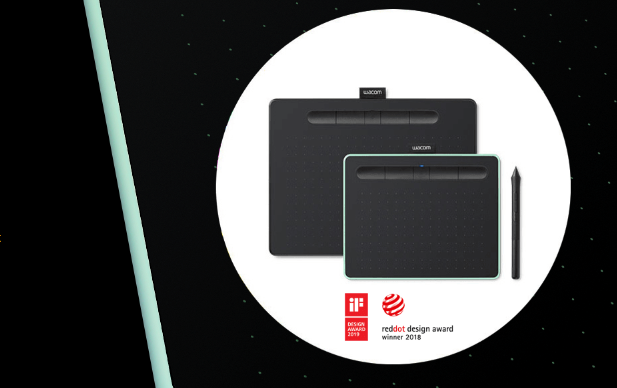
Wacom Intuos: Explore New Ways to Get Creative With Wacom Intuos
With a light, super-accurate pen and free downloadable software* to suit your style, Wacom Intuos is built to bring your wildest ideas to life.
Live. Dare. Create.
*To get your complimentary software you need to sign-in or create a Wacom ID with your personal data and register your Intuos. Software compatibility depends on operating system.
Clip Studio Paint Pro
Clip Studio Paint Pro 2-year license* with natural pen strokes, quick coloring, unlimited tones and 3D figure templates, it has everything a budding comic-book artist or Manga lover needs to bring action to life.
*To begin 2-year complimentary trial of Clip Studio Paint Pro, registration with Celsys is required. Terms and conditions apply.
Corel Painter Essentials 8
Corel Painter Essentials 8* release your inner artist with a wide variety of painting styles, award-winning Natural-Media brushes and photo effects to create an authentic, hand-painted look.
*To begin 90-day complimentary trial of Corel Painter Essentials 8, registration with Corel is required. Terms and conditions apply.
Corel Aftershot Pro 3
Corel Aftershot Pro 3* turn your passion for photography into unforgettable memories with powerful processing tools and presets to enhance any image from good to great.
*To begin 90-day complimentary trial of Corel Aftershot Pro 3, registration with Corel is required. Terms and conditions apply.
Skillshare
Skillshare is an online learning community with thousands of inspiring classes for creative and curious people. Explore new skills, deepen existing passions, and get lost in creativity – including classes designed to improve your skills on your Wacom One.*
*To begin 3-month complimentary trial of Skillshare, registration with Skillshare is required.
Luminar Neo
Luminar Neo* harness the power of AI to take your photos to the next level alongside your Wacom Intuos. Relight your photos, replace the sky with one click, and easily make professional quality edits.
*To begin 3-month complimentary trial of Luminar Neo, registration with Skylum is required. Terms and conditions apply.
Boris FX Optics
Boris FX Optics* contains lens flares, Hollywood-grade filters, retouching, and more – everything you need to create stunning photos for social media and beyond.
*To begin 12-month complimentary trial of Boris FX Optics, registration with Boris FX is required. Terms and conditions apply.
Magma
Magma is a collaborative drawing platform for global artists, featuring a user-friendly interface for beginners. Join a community of over 4 million users, connect with fellow artists, and enhance your skills. Register your Wacom device for a three-month Magma Blaze trial, offering ad-free access, more canvas participants, layers, and storage.
*To begin 3-month complimentary trial of Magma, registration with Magma is required.
Concepts
Concepts sketch, plan, edit, and share all your big ideas with your Wacom product and a 3 month trial of Concepts.* This infinite canvas app includes a minimal interface that's easy to learn so you can focus on your creativity. Features include vector-based editing, playful color wheels, intuitive gestures, and a speedy performance. This offer is only valid on Windows OS.
*To begin 3-month complimentary trial of Concepts, registration with Concepts is required. Terms and conditions apply.
Where the Magic Happens
Digital drawing, painting or photo editing? Whatever you love to create, Wacom Intuos has everything you need to make it happen. It’s easy to setup and use, and offers up to four unique creative applications for you to download for free*.
*To get your complimentary software you need to sign-in or create a Wacom ID with your personal data and register your Intuos. Software compatibility depends on operating system.
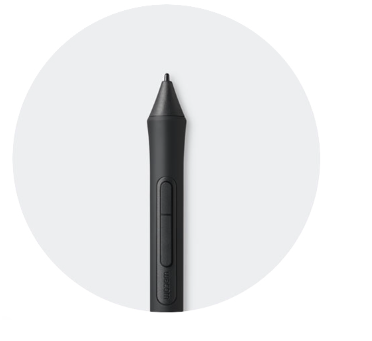
The first thing you’ll experience is how natural the pen feels. 4k pressure levels and ergonomic design deliver better precision and control.
Wacom Intuos* Also Works With Chromebook. Explore New Ways of Getting Creative, With Downloadable Software and Natural-feel Precision Pen
Simple to setup and with natural pressure sensitivity, there’s nothing holding your creativity back. And to make sure you’re always able to get the most out of every project, downloadable creative and education software is available, too.
This product works with devices capable of running the latest version of ChromeOS and has been certified to meet Google's compatibility standards. Google is not responsible for the operation of this product or its compliance with safety requirements. Android, Chromebook, and the works with Chromebook badge are trademarks of Google LLC. Pen must be used with the tablet to function with ChromeOS. The Android robot is reproduced or modified from work created and shared by Google and used according to terms described in the Creative Commons 3.0 Attribution License.
*ExpressKeys support coming later in 2022.
Yours is a Mighty Pen
The first thing you’ll notice when using Wacom Intuos is how natural it feels. Thanks to EMR (Electro-Magnetic Resonance) technology, the battery free pen with 4,096 levels of pressure sensitivity provides a natural drawing experience that can keep going as long as you do. Whilst its ergonomic design and light weight make it sit comfortably in your hand, allowing you to experience both precision and control.
- 4,096 pen pressure sensitivity
- +/- 0.25 mm digital tolerance in accuracy
- Battery-free pen
- 7mm reading height
Tailored to You
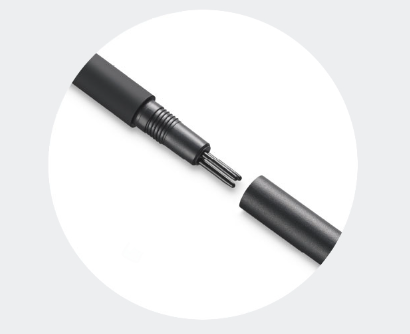
Whatever drawing style you use there are a variety of Felt and Flex Nibs to choose from*, all of them cleverly stored inside the pen itself. You can even customize the pen’s two buttons and the tablet’s four ExpressKeys** to suit your creative process.
*Standard nibs are included. Felt and Flex nibs are sold separately.
**ExpressKeys supported on Windows PC and Mac.
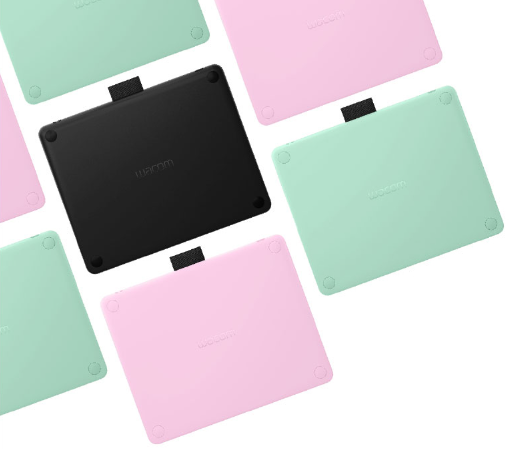
Every Masterpiece Needs a Frame
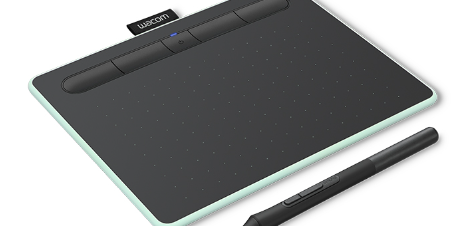
From studio to study, bedroom to beyond, Wacom Intuos is available in a range of striking colors to suit any surrounding. Choose from black, pistachio, or berry*.
*Berry only available in certain regions.
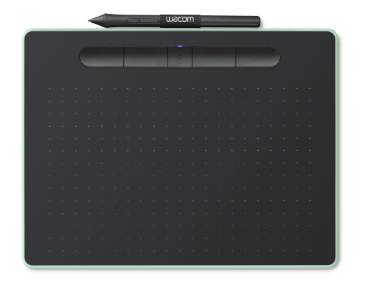
Clever, Compact and Stylish
The super slim and compact design means that this pen tablet is at home anywhere. But don’t be fooled by its looks, it’s still as durable and powerful as ever.
- 8.8 mm thin tablet (compares to your typical smartphone)
Push Your Creativity to the Edges
With the active drawing area stretching edge to edge you have more room on your desk and more room to create.
- 7 inch active area (Small sizes), 10 inch (Medium sizes)
- More than 75% of tablet width is active area
- 100 lines per mm recognition of pen on tablet (tablet density)
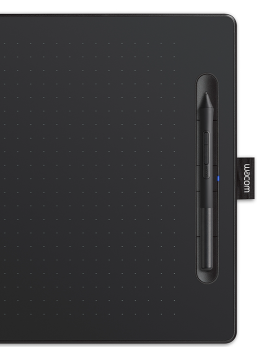
Everything at Your Fingertips
Wacom Intuos is designed to make your creative process hassle-free. The built-in pen tray holds your pen in place, whilst the four ExpressKeys* allow you to work quickly and easily. Plus, the addition of Bluetooth connectivity on selected models means you can connect to your computer at the click of a button.
*ExpressKeys supported on Windows PC and Mac.
A Cutting Edge Blank Canvas
Tailor the Wacom Intuos to enhance your style by downloading a range of free creative applications*. Combined with the power of the pen, greatness awaits.
*To get your complimentary software you need to sign-in or create a Wacom ID with your personal data and register your Intuos. Software compatibility depends on operating system.
Great Bundled Apps for Education*
Gain 3 months complimentary access to great bundled apps specially tailored for education. The apps enable teachers and students to collaborate and share ideas just as easily as in the classroom.
*To get your complimentary software you need to sign-in or create a Wacom ID with your personal data and register your One by Wacom.
Foxit PDF Editor
Get ready to create, convert, edit, sign, and draw on any PDF across desktop, mobile, and web. People everywhere are taking charge of their document solutions with Foxit PDF Editor, and now you can too.* Use Foxit with your Wacom device to quickly customize, mark up, sign, and manage your PDF documents.
*To begin 3-month complimentary trial of Foxit, registration with Foxit is required. Terms and conditions apply.
Ready, Set, Create
The Wacom Intuos is primed and ready. Simply connect the pen tablet to your Mac, PC or Chromebook* via USB, download and install the driver**, complete the easy registration and you’re good to go. With online tutorials and free downloadable software***, you’ll be creating in no time.
*Some Chromebook devices require a USB-C adapter.Pen must be used with the tablet to function with Chrome OS.
**Driver download and installation only on Windows PC and Mac.
***To get your complimentary software you need to sign-in or create a Wacom ID with your personal data and register your Intuos. Software compatibility depends on operating system.
Connect Your Wacom Intuos to Your Android Device
Enjoy creating on your Wacom Intuos and see your drawings and paintings come to life on your Android smartphone or tablet (OS version 6.0 or later).
Wacom Drawing Glove* Sold Separately: Freedom to Create Without Distraction
Eliminate smudges and reduce friction between screen and hand. The drawing experience never felt so good with the Wacom Drawing Glove. Simply draw with confidence.
Sustainability: Better for Drawing, Better for the Environment
Designed with eco-friendly recycled materials, the Wacom Drawing Glove allows you to draw with the freedom of knowing you are helping the world Wacom live in. Recycled Polyester and Spandex offer breathability, stretch and durability for a comfortable fit. Feel comfortable drawing anything, and know that you’re contributing to a better environment.
Drawing: Clearer, Cleaner Drawing
Use the Wacom Drawing Glove and enjoy a natural drawing experience. Say goodbye to unnecessary smudges, fingerprints and minimize friction from hand to screen or pen tablet. And with everything clearly visible on screen, nothing comes between you and your creation. Now, you’re free to draw comfortably for hours.
Design: Fits Like a Glove, Works Like a Dream
Wacom Drawing Glove’s unique fingerless design and seamless edge allows for a natural working experience. Focus on your drawing and access touch functionality on screen as well as the keyboard. Designed to work perfectly whether you're left or right-handed. Sound good? You’ll find it feels good too.
What's in the Box:
- Wacom Intuos creative pen tablet small or medium, with or without Bluetooth
- Pressure-sensitive, battery-free Wacom Pen 4K
- PVC-free USB-A cable with cable tidy and L-shaped connector
- 3 extra standard nibs (located inside pen)
Product Features:
- Technology: Patented electromagnetic resonance method
- Pen: Wacom Pen 4K (LP-1100K)
- Expresskeys
Specs
General
- Brand Wacom
- Product Category Tablets
- Product Type Pen Tablet
- Product Specific Colour Black
- Colour Black
Connectivity
- Wireless Connectivity Bluetooth
- Wireless Ready Yes
- USB-C Ports 1
Platform
- Compatibility Windows, macOS, some Android devices
Battery & Power
- Power Source Battery
- Battery Type Lithium-ion
Dimensions
- Width 264 mm
- Depth 200 mm
- Height 8.8 mm
- Weight 0.41 kg
Delivery
We offer a comprehensive nationwide (excluding Republic of Ireland) delivery service; we aim to deliver all orders as quickly as possible.
| Item Type | Delivered In | Delivered By |
|---|---|---|
| Small Items | 2 Working days | DPD |
| Large Electrical Appliance | 3-5 Working days | Independent transport company |
| Furniture & Bedding | 3-5 Working days | Independent transport company |
Please note: if you have ordered furniture and bedding products that involve a lead time, are customised or made to measure, we will contact you to discuss delivery.
Free Click & Collect In Store
Can't wait for delivery or don't want to pay additional delivery charges? It's incredibly simple to collect your online order in store and get your hands on your product quickly and easily. Simply select the Click & Collect option and head to your nearest Harvey Norman store to collect your order.
- During checkout, select “Click & Collect” and select your preferred store.
- After your order is placed, you will receive an order acknowledgement email with your order number.
- Once the store has confirmed your order and reserved the stock, you will receive an email to inform you that your order is "Ready for collection". If you want to use "Contactless Click & Collect" select this option on this email. Please Note: Some large items are held in an off-site warehouse. We will notify you of the collection location in your Ready for Pickup email.
- Bring your order number to the store you selected for Click & Collect, along with photo ID and the credit card you used to make the order.
- Speak to one of our staff and your order should be processed in minutes.
- If availing of Contactless Click & Collect, please click the link in your email "ready to pick up" to let the store know you are on your way. When you have parked in the designated parking bay, open your email, and choose the "I'm here" option and a member of staff will bring your purchase out to your car.
Easy returns
Store Purchases: For all items purchased from a physical store, please return to your local Harvey Norman Store. Please see Terms & Conditions here.
Online Purchases: For all items purchased via our Online Store (website), please fill out our Contact Form where our team can guide you through the process.
Description
Description
Wacom Intuos: Explore New Ways to Get Creative With Wacom Intuos
With a light, super-accurate pen and free downloadable software* to suit your style, Wacom Intuos is built to bring your wildest ideas to life.
Live. Dare. Create.
*To get your complimentary software you need to sign-in or create a Wacom ID with your personal data and register your Intuos. Software compatibility depends on operating system.
Clip Studio Paint Pro
Clip Studio Paint Pro 2-year license* with natural pen strokes, quick coloring, unlimited tones and 3D figure templates, it has everything a budding comic-book artist or Manga lover needs to bring action to life.
*To begin 2-year complimentary trial of Clip Studio Paint Pro, registration with Celsys is required. Terms and conditions apply.
Corel Painter Essentials 8
Corel Painter Essentials 8* release your inner artist with a wide variety of painting styles, award-winning Natural-Media brushes and photo effects to create an authentic, hand-painted look.
*To begin 90-day complimentary trial of Corel Painter Essentials 8, registration with Corel is required. Terms and conditions apply.
Corel Aftershot Pro 3
Corel Aftershot Pro 3* turn your passion for photography into unforgettable memories with powerful processing tools and presets to enhance any image from good to great.
*To begin 90-day complimentary trial of Corel Aftershot Pro 3, registration with Corel is required. Terms and conditions apply.
Skillshare
Skillshare is an online learning community with thousands of inspiring classes for creative and curious people. Explore new skills, deepen existing passions, and get lost in creativity – including classes designed to improve your skills on your Wacom One.*
*To begin 3-month complimentary trial of Skillshare, registration with Skillshare is required.
Luminar Neo
Luminar Neo* harness the power of AI to take your photos to the next level alongside your Wacom Intuos. Relight your photos, replace the sky with one click, and easily make professional quality edits.
*To begin 3-month complimentary trial of Luminar Neo, registration with Skylum is required. Terms and conditions apply.
Boris FX Optics
Boris FX Optics* contains lens flares, Hollywood-grade filters, retouching, and more – everything you need to create stunning photos for social media and beyond.
*To begin 12-month complimentary trial of Boris FX Optics, registration with Boris FX is required. Terms and conditions apply.
Magma
Magma is a collaborative drawing platform for global artists, featuring a user-friendly interface for beginners. Join a community of over 4 million users, connect with fellow artists, and enhance your skills. Register your Wacom device for a three-month Magma Blaze trial, offering ad-free access, more canvas participants, layers, and storage.
*To begin 3-month complimentary trial of Magma, registration with Magma is required.
Concepts
Concepts sketch, plan, edit, and share all your big ideas with your Wacom product and a 3 month trial of Concepts.* This infinite canvas app includes a minimal interface that's easy to learn so you can focus on your creativity. Features include vector-based editing, playful color wheels, intuitive gestures, and a speedy performance. This offer is only valid on Windows OS.
*To begin 3-month complimentary trial of Concepts, registration with Concepts is required. Terms and conditions apply.
Where the Magic Happens
Digital drawing, painting or photo editing? Whatever you love to create, Wacom Intuos has everything you need to make it happen. It’s easy to setup and use, and offers up to four unique creative applications for you to download for free*.
*To get your complimentary software you need to sign-in or create a Wacom ID with your personal data and register your Intuos. Software compatibility depends on operating system.
The first thing you’ll experience is how natural the pen feels. 4k pressure levels and ergonomic design deliver better precision and control.
Wacom Intuos* Also Works With Chromebook. Explore New Ways of Getting Creative, With Downloadable Software and Natural-feel Precision Pen
Simple to setup and with natural pressure sensitivity, there’s nothing holding your creativity back. And to make sure you’re always able to get the most out of every project, downloadable creative and education software is available, too.
This product works with devices capable of running the latest version of ChromeOS and has been certified to meet Google's compatibility standards. Google is not responsible for the operation of this product or its compliance with safety requirements. Android, Chromebook, and the works with Chromebook badge are trademarks of Google LLC. Pen must be used with the tablet to function with ChromeOS. The Android robot is reproduced or modified from work created and shared by Google and used according to terms described in the Creative Commons 3.0 Attribution License.
*ExpressKeys support coming later in 2022.
Yours is a Mighty Pen
The first thing you’ll notice when using Wacom Intuos is how natural it feels. Thanks to EMR (Electro-Magnetic Resonance) technology, the battery free pen with 4,096 levels of pressure sensitivity provides a natural drawing experience that can keep going as long as you do. Whilst its ergonomic design and light weight make it sit comfortably in your hand, allowing you to experience both precision and control.
- 4,096 pen pressure sensitivity
- +/- 0.25 mm digital tolerance in accuracy
- Battery-free pen
- 7mm reading height
Tailored to You
Whatever drawing style you use there are a variety of Felt and Flex Nibs to choose from*, all of them cleverly stored inside the pen itself. You can even customize the pen’s two buttons and the tablet’s four ExpressKeys** to suit your creative process.
*Standard nibs are included. Felt and Flex nibs are sold separately.
**ExpressKeys supported on Windows PC and Mac.
Every Masterpiece Needs a Frame
From studio to study, bedroom to beyond, Wacom Intuos is available in a range of striking colors to suit any surrounding. Choose from black, pistachio, or berry*.
*Berry only available in certain regions.
Clever, Compact and Stylish
The super slim and compact design means that this pen tablet is at home anywhere. But don’t be fooled by its looks, it’s still as durable and powerful as ever.
- 8.8 mm thin tablet (compares to your typical smartphone)
Push Your Creativity to the Edges
With the active drawing area stretching edge to edge you have more room on your desk and more room to create.
- 7 inch active area (Small sizes), 10 inch (Medium sizes)
- More than 75% of tablet width is active area
- 100 lines per mm recognition of pen on tablet (tablet density)
Everything at Your Fingertips
Wacom Intuos is designed to make your creative process hassle-free. The built-in pen tray holds your pen in place, whilst the four ExpressKeys* allow you to work quickly and easily. Plus, the addition of Bluetooth connectivity on selected models means you can connect to your computer at the click of a button.
*ExpressKeys supported on Windows PC and Mac.
A Cutting Edge Blank Canvas
Tailor the Wacom Intuos to enhance your style by downloading a range of free creative applications*. Combined with the power of the pen, greatness awaits.
*To get your complimentary software you need to sign-in or create a Wacom ID with your personal data and register your Intuos. Software compatibility depends on operating system.
Great Bundled Apps for Education*
Gain 3 months complimentary access to great bundled apps specially tailored for education. The apps enable teachers and students to collaborate and share ideas just as easily as in the classroom.
*To get your complimentary software you need to sign-in or create a Wacom ID with your personal data and register your One by Wacom.
Foxit PDF Editor
Get ready to create, convert, edit, sign, and draw on any PDF across desktop, mobile, and web. People everywhere are taking charge of their document solutions with Foxit PDF Editor, and now you can too.* Use Foxit with your Wacom device to quickly customize, mark up, sign, and manage your PDF documents.
*To begin 3-month complimentary trial of Foxit, registration with Foxit is required. Terms and conditions apply.
Ready, Set, Create
The Wacom Intuos is primed and ready. Simply connect the pen tablet to your Mac, PC or Chromebook* via USB, download and install the driver**, complete the easy registration and you’re good to go. With online tutorials and free downloadable software***, you’ll be creating in no time.
*Some Chromebook devices require a USB-C adapter.Pen must be used with the tablet to function with Chrome OS.
**Driver download and installation only on Windows PC and Mac.
***To get your complimentary software you need to sign-in or create a Wacom ID with your personal data and register your Intuos. Software compatibility depends on operating system.
Connect Your Wacom Intuos to Your Android Device
Enjoy creating on your Wacom Intuos and see your drawings and paintings come to life on your Android smartphone or tablet (OS version 6.0 or later).
Wacom Drawing Glove* Sold Separately: Freedom to Create Without Distraction
Eliminate smudges and reduce friction between screen and hand. The drawing experience never felt so good with the Wacom Drawing Glove. Simply draw with confidence.
Sustainability: Better for Drawing, Better for the Environment
Designed with eco-friendly recycled materials, the Wacom Drawing Glove allows you to draw with the freedom of knowing you are helping the world Wacom live in. Recycled Polyester and Spandex offer breathability, stretch and durability for a comfortable fit. Feel comfortable drawing anything, and know that you’re contributing to a better environment.
Drawing: Clearer, Cleaner Drawing
Use the Wacom Drawing Glove and enjoy a natural drawing experience. Say goodbye to unnecessary smudges, fingerprints and minimize friction from hand to screen or pen tablet. And with everything clearly visible on screen, nothing comes between you and your creation. Now, you’re free to draw comfortably for hours.
Design: Fits Like a Glove, Works Like a Dream
Wacom Drawing Glove’s unique fingerless design and seamless edge allows for a natural working experience. Focus on your drawing and access touch functionality on screen as well as the keyboard. Designed to work perfectly whether you're left or right-handed. Sound good? You’ll find it feels good too.
What's in the Box:
- Wacom Intuos creative pen tablet small or medium, with or without Bluetooth
- Pressure-sensitive, battery-free Wacom Pen 4K
- PVC-free USB-A cable with cable tidy and L-shaped connector
- 3 extra standard nibs (located inside pen)
Product Features:
- Technology: Patented electromagnetic resonance method
- Pen: Wacom Pen 4K (LP-1100K)
- Expresskeys
Specifications
Specs
General
- Brand Wacom
- Product Category Tablets
- Product Type Pen Tablet
- Product Specific Colour Black
- Colour Black
Connectivity
- Wireless Connectivity Bluetooth
- Wireless Ready Yes
- USB-C Ports 1
Platform
- Compatibility Windows, macOS, some Android devices
Battery & Power
- Power Source Battery
- Battery Type Lithium-ion
Dimensions
- Width 264 mm
- Depth 200 mm
- Height 8.8 mm
- Weight 0.41 kg
Delivery & Returns
Delivery
We offer a comprehensive nationwide (excluding Republic of Ireland) delivery service; we aim to deliver all orders as quickly as possible.
| Item Type | Delivered In | Delivered By |
|---|---|---|
| Small Items | 2 Working days | DPD |
| Large Electrical Appliance | 3-5 Working days | Independent transport company |
| Furniture & Bedding | 3-5 Working days | Independent transport company |
Please note: if you have ordered furniture and bedding products that involve a lead time, are customised or made to measure, we will contact you to discuss delivery.
Free Click & Collect In Store
Can't wait for delivery or don't want to pay additional delivery charges? It's incredibly simple to collect your online order in store and get your hands on your product quickly and easily. Simply select the Click & Collect option and head to your nearest Harvey Norman store to collect your order.
- During checkout, select “Click & Collect” and select your preferred store.
- After your order is placed, you will receive an order acknowledgement email with your order number.
- Once the store has confirmed your order and reserved the stock, you will receive an email to inform you that your order is "Ready for collection". If you want to use "Contactless Click & Collect" select this option on this email. Please Note: Some large items are held in an off-site warehouse. We will notify you of the collection location in your Ready for Pickup email.
- Bring your order number to the store you selected for Click & Collect, along with photo ID and the credit card you used to make the order.
- Speak to one of our staff and your order should be processed in minutes.
- If availing of Contactless Click & Collect, please click the link in your email "ready to pick up" to let the store know you are on your way. When you have parked in the designated parking bay, open your email, and choose the "I'm here" option and a member of staff will bring your purchase out to your car.
Easy returns
Store Purchases: For all items purchased from a physical store, please return to your local Harvey Norman Store. Please see Terms & Conditions here.
Online Purchases: For all items purchased via our Online Store (website), please fill out our Contact Form where our team can guide you through the process.
Reviews
You may also like
Recently viewed
Compare
Secure Online Shopping