Wacom Intuos Pro Pen Tablet | Large | Black



interest free payments of
Late fees apply.
Delivery to
Delivery
Collect from
Click & Collect
Collect in store
Nearest store with stock
Nearest store with stock

Available services
Description
Check out the video:
A Workflow that Works
Work is how you create. Flow is the feeling of creating. Experience perfect harmony between Work and Flow with Intuos Pro, Wacom's flagship line of professional pen tablets. They’ve been completely redesigned to provide an all-new level of precision and control over your work - and an intuitive creative experience that lets your ideas flow naturally.
Check out the video:
Redesigned From the Inside Out
An essential tool for generations of creatives, the Intuos Pro (2025) has been completely redesigned with Wacom’s most advanced pen tablet technology. The Wacom Pro Pen 3, combined with a powerful new chip and digitizer set, provides Wacom’s most accurate pen stroke, longer battery life*, and intuitive controls in an ultra-slim, compact design.
* Compared to Intuos Pro 2017
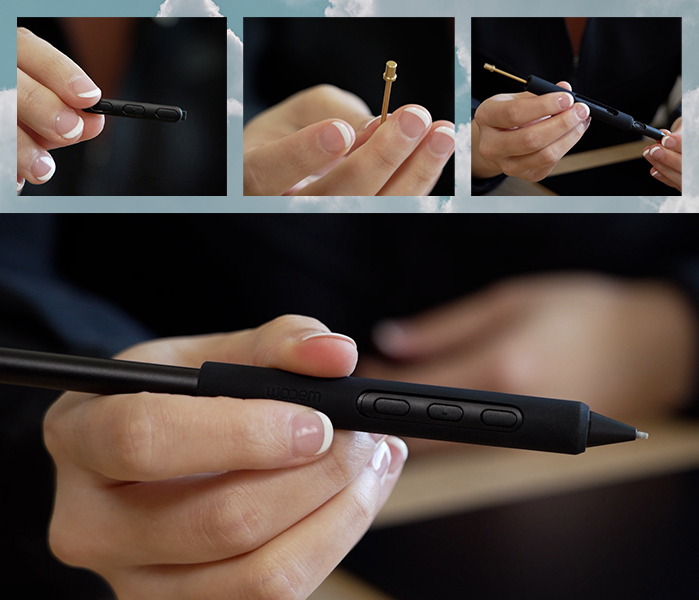
A Stroke of Genius
Pro Pen 3 combines Wacom’s 40+ years of experience and Wacom latest technical innovations, to create Wacom's most sensitive, accurate, and natural pen performance. Amazing stroke performance isn’t all – it's also customizable through different grip and button configurations, multiple nib options, and an adjustable weight so it can be perfectly calibrated to your exact specifications. And it still requires no battery or charging, so it is always ready to go.
Check out the video:
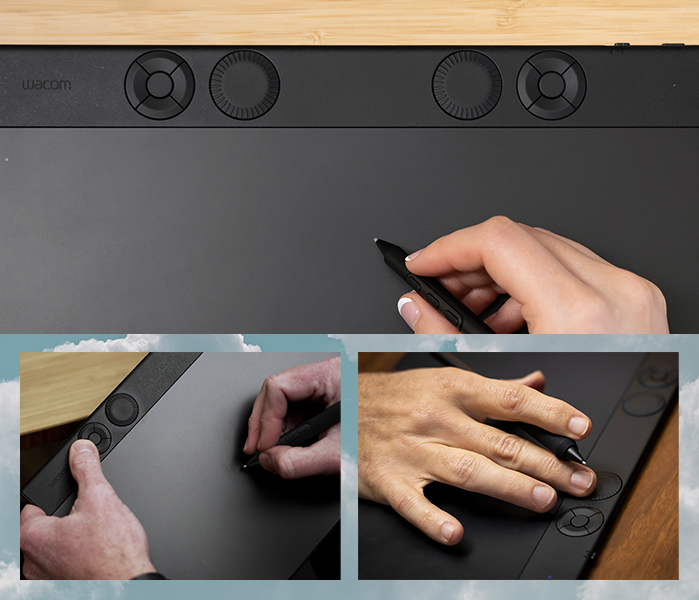
Get Dialed In
Intuos Pro features an updated ergonomic layout of tactile, mechanical dials and Express Keys designed for use with either hand and ideally positioned for use alongside a keyboard. They come pre-configured to perform a set of common functions – but they are easily customized, both individually and in sets, to your favorite shortcuts specific to each creative application in your workflow.
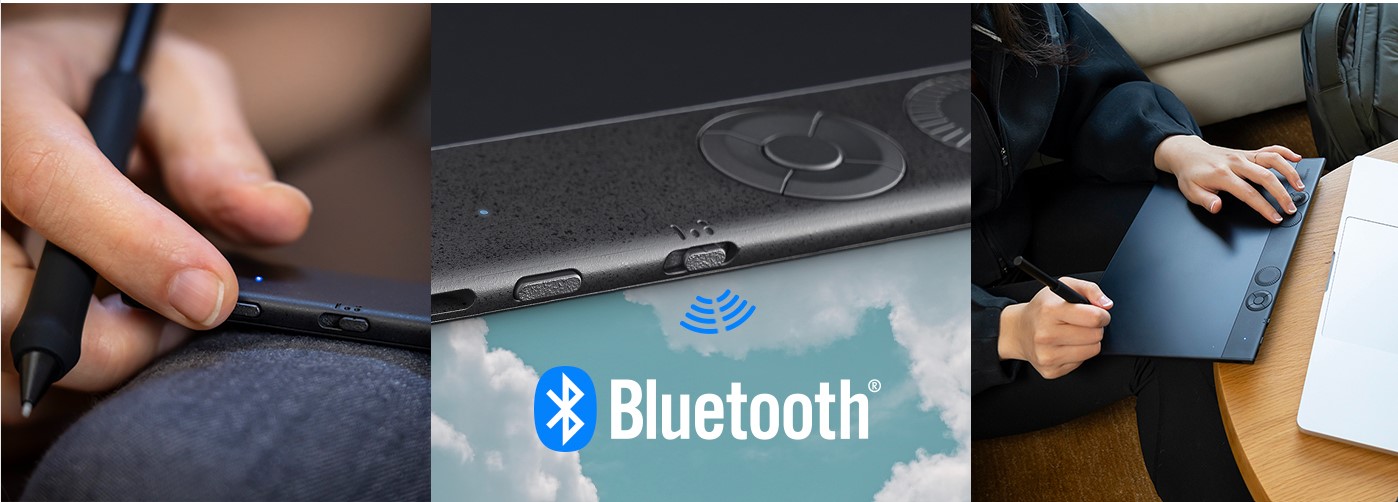
Making Connections
All three tablet sizes of Intuos Pro can be used and charged with the included USB cable or connected wirelessly with Bluetooth 5.3 with up to 16 hours of battery life per charge. A new wireless feature allows it to remain paired to two computers at the same time, for example a home computer and a work computer, and a convenient connector button on the tablet allows you to easily switch between the wired connection and either wireless computer.
Check out the video:
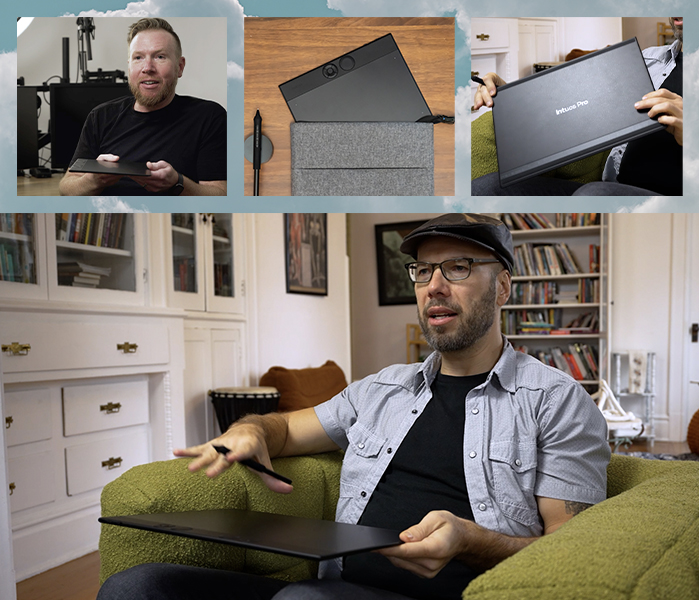
Compatible, Versatile and Compact
Whether you use Windows or Mac, with Intuos Pro you can accomplish any creative task with efficiency, consistency, and dependable performance every single time. It’s also ultra-thin, portable and rugged with its magnesium alloy back case – the perfect tool for hybrid and mobile working styles.
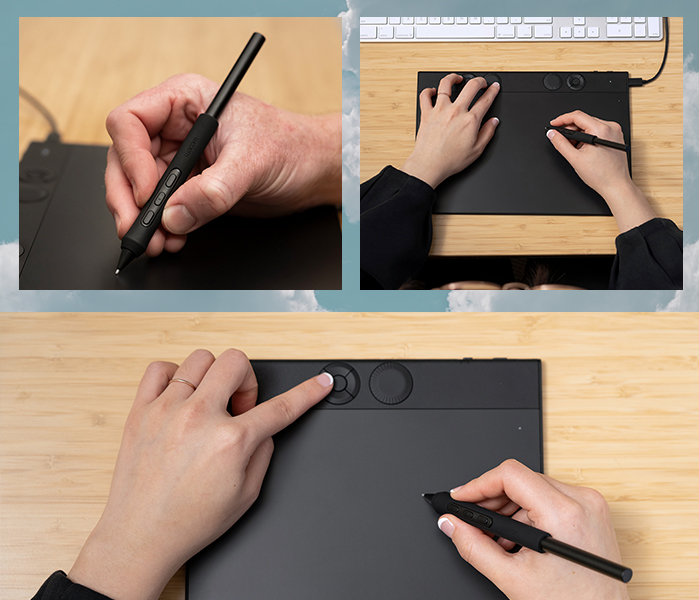
Custom Comfort, Efficiency and Productivity
The robust customization options and ergonomic layout of the new Express keys, mechanical dials, configurable pen buttons and on-screen controls seamlessly integrate with your software to make even the most complex workflows easy to control. Set-up is easy with convenient preset groups as well as the ability to individually configure each feature for application specific use.
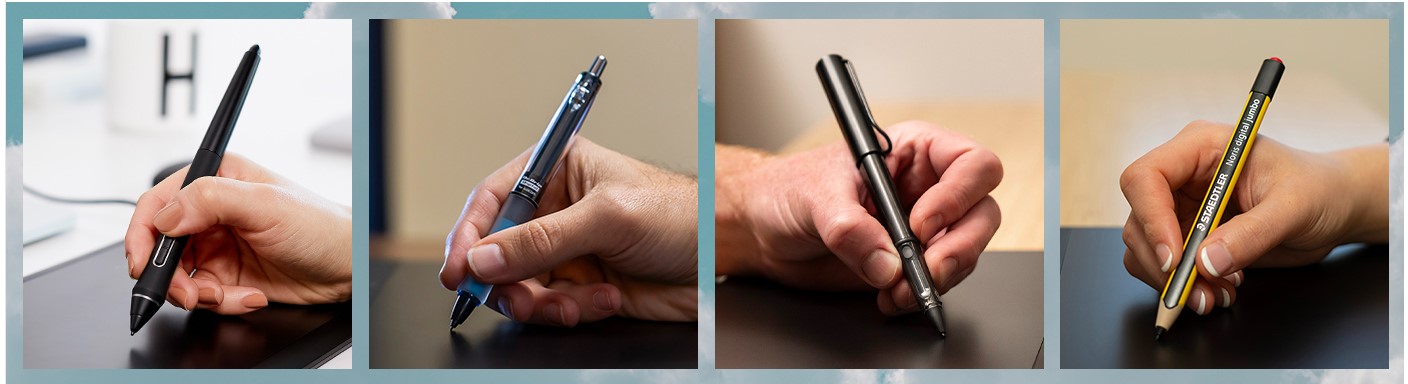
Customize Your Stroke
Intuos Pro is Wacom’s first professional creative pen tablet to incorporate dual pen technology, meaning it works with the included Pro Pen 3, an older Wacom pro pen like the Wacom Pro Pen 2, or a stylus made with EMR technology from Pilot, LAMY, or STAEDTLER.
Hardware Requirements
USB port*, Bluetooth Low Energy for wireless connection. Internet access to download driver** and select downloadable software.***
*For wired connections, USB-A to USB-C adapter may be required.
** Download and installation of driver is required to access full product functionality.
**Wacom ID and product registration required. Agreement to Terms of Use and respective license agreement(s) from bonus software companies required.
System Requirements
- System requirements
- Windows 10 or later (latest service pack/build)
- macOS 13 or later
- Bluetooth for wireless connection.
- Internet connection to download driver* and software
What's in the Box:
- Wacom Pro Pen 3 (battery free) with Flare grip, Balance weight, and Tall side switch insert with buttons
- Pen stand (includes 5 standard nibs, 3 Felt nibs and 2 Rubber nibs, Nib Remover)
- USB-C to A cable (1.8m)
- Pen accessories: Straight grip, Tall side switch insert without buttons, Short side switch insert with buttons, and Short side switch insert without buttons
Product Features:
- Number of switches: 3 side switches
- Pen: Wacom Pro Pen 3 & 3rd party compatible pens
- Tablet size: 16:9 aspect ratio Small, Medium & Large sizes
- Ergonomics: Right or Left-handed use
- Productivity Boosters: Express Keys and mechanical Dial at top of tablet
- Easy to Connect: Bluetooth or USB cable connectivity
- Pen resolution: 5080 lpi
- Ultra Thin: 4 mm (0.16 in) thin
- Pen Type: Pressure-sensitive, cordless, battery-free
- Pen Technology: Patented electromagnetic resonance method
- Replacement nibs: 10 Pro Pen 3 nibs (5 standard, 3 felt, and 2 rubber included in pen stand)
- Grips: Latex-free silicone rubber
- Desktop pen stand
Specs
General
- Brand Wacom
- Product Category Computer Accessories
- Product Type Pen Tablet
- Product Specific Colour Black
- Colour Black
Connectivity
- Wireless Connectivity USB, Bluetooth
Display
- Aspect Ratio 16:9
Battery & Power
- Power Source Battery
- Battery Life 16 Hours
Dimensions
- Width 377 mm
- Depth 253 mm
- Height 7 mm
- Weight 660 g
Delivery
We offer a comprehensive nationwide (excluding Republic of Ireland) delivery service; we aim to deliver all orders as quickly as possible.
| Item Type | Delivered In | Delivered By |
|---|---|---|
| Small Items | 2 Working days | DPD |
| Large Electrical Appliance | 3-5 Working days | Independent transport company |
| Furniture & Bedding | 3-5 Working days | Independent transport company |
Please note: if you have ordered furniture and bedding products that involve a lead time, are customised or made to measure, we will contact you to discuss delivery.
Free Click & Collect In Store
Can't wait for delivery or don't want to pay additional delivery charges? It's incredibly simple to collect your online order in store and get your hands on your product quickly and easily. Simply select the Click & Collect option and head to your nearest Harvey Norman store to collect your order.
- During checkout, select “Click & Collect” and select your preferred store.
- After your order is placed, you will receive an order acknowledgement email with your order number.
- Once the store has confirmed your order and reserved the stock, you will receive an email to inform you that your order is "Ready for collection". If you want to use "Contactless Click & Collect" select this option on this email. Please Note: Some large items are held in an off-site warehouse. We will notify you of the collection location in your Ready for Pickup email.
- Bring your order number to the store you selected for Click & Collect, along with photo ID and the credit card you used to make the order.
- Speak to one of our staff and your order should be processed in minutes.
- If availing of Contactless Click & Collect, please click the link in your email "ready to pick up" to let the store know you are on your way. When you have parked in the designated parking bay, open your email, and choose the "I'm here" option and a member of staff will bring your purchase out to your car.
Easy returns
Store Purchases: For all items purchased from a physical store, please return to your local Harvey Norman Store. Please see Terms & Conditions here.
Online Purchases: For all items purchased via our Online Store (website), please fill out our Contact Form where our team can guide you through the process.
Description
Description
Check out the video:
A Workflow that Works
Work is how you create. Flow is the feeling of creating. Experience perfect harmony between Work and Flow with Intuos Pro, Wacom's flagship line of professional pen tablets. They’ve been completely redesigned to provide an all-new level of precision and control over your work - and an intuitive creative experience that lets your ideas flow naturally.
Check out the video:
Redesigned From the Inside Out
An essential tool for generations of creatives, the Intuos Pro (2025) has been completely redesigned with Wacom’s most advanced pen tablet technology. The Wacom Pro Pen 3, combined with a powerful new chip and digitizer set, provides Wacom’s most accurate pen stroke, longer battery life*, and intuitive controls in an ultra-slim, compact design.
* Compared to Intuos Pro 2017
A Stroke of Genius
Pro Pen 3 combines Wacom’s 40+ years of experience and Wacom latest technical innovations, to create Wacom's most sensitive, accurate, and natural pen performance. Amazing stroke performance isn’t all – it's also customizable through different grip and button configurations, multiple nib options, and an adjustable weight so it can be perfectly calibrated to your exact specifications. And it still requires no battery or charging, so it is always ready to go.
Check out the video:
Get Dialed In
Intuos Pro features an updated ergonomic layout of tactile, mechanical dials and Express Keys designed for use with either hand and ideally positioned for use alongside a keyboard. They come pre-configured to perform a set of common functions – but they are easily customized, both individually and in sets, to your favorite shortcuts specific to each creative application in your workflow.
Making Connections
All three tablet sizes of Intuos Pro can be used and charged with the included USB cable or connected wirelessly with Bluetooth 5.3 with up to 16 hours of battery life per charge. A new wireless feature allows it to remain paired to two computers at the same time, for example a home computer and a work computer, and a convenient connector button on the tablet allows you to easily switch between the wired connection and either wireless computer.
Check out the video:
Compatible, Versatile and Compact
Whether you use Windows or Mac, with Intuos Pro you can accomplish any creative task with efficiency, consistency, and dependable performance every single time. It’s also ultra-thin, portable and rugged with its magnesium alloy back case – the perfect tool for hybrid and mobile working styles.
Custom Comfort, Efficiency and Productivity
The robust customization options and ergonomic layout of the new Express keys, mechanical dials, configurable pen buttons and on-screen controls seamlessly integrate with your software to make even the most complex workflows easy to control. Set-up is easy with convenient preset groups as well as the ability to individually configure each feature for application specific use.
Customize Your Stroke
Intuos Pro is Wacom’s first professional creative pen tablet to incorporate dual pen technology, meaning it works with the included Pro Pen 3, an older Wacom pro pen like the Wacom Pro Pen 2, or a stylus made with EMR technology from Pilot, LAMY, or STAEDTLER.
Hardware Requirements
USB port*, Bluetooth Low Energy for wireless connection. Internet access to download driver** and select downloadable software.***
*For wired connections, USB-A to USB-C adapter may be required.
** Download and installation of driver is required to access full product functionality.
**Wacom ID and product registration required. Agreement to Terms of Use and respective license agreement(s) from bonus software companies required.
System Requirements
- System requirements
- Windows 10 or later (latest service pack/build)
- macOS 13 or later
- Bluetooth for wireless connection.
- Internet connection to download driver* and software
What's in the Box:
- Wacom Pro Pen 3 (battery free) with Flare grip, Balance weight, and Tall side switch insert with buttons
- Pen stand (includes 5 standard nibs, 3 Felt nibs and 2 Rubber nibs, Nib Remover)
- USB-C to A cable (1.8m)
- Pen accessories: Straight grip, Tall side switch insert without buttons, Short side switch insert with buttons, and Short side switch insert without buttons
Product Features:
- Number of switches: 3 side switches
- Pen: Wacom Pro Pen 3 & 3rd party compatible pens
- Tablet size: 16:9 aspect ratio Small, Medium & Large sizes
- Ergonomics: Right or Left-handed use
- Productivity Boosters: Express Keys and mechanical Dial at top of tablet
- Easy to Connect: Bluetooth or USB cable connectivity
- Pen resolution: 5080 lpi
- Ultra Thin: 4 mm (0.16 in) thin
- Pen Type: Pressure-sensitive, cordless, battery-free
- Pen Technology: Patented electromagnetic resonance method
- Replacement nibs: 10 Pro Pen 3 nibs (5 standard, 3 felt, and 2 rubber included in pen stand)
- Grips: Latex-free silicone rubber
- Desktop pen stand
Specifications
Specs
General
- Brand Wacom
- Product Category Computer Accessories
- Product Type Pen Tablet
- Product Specific Colour Black
- Colour Black
Connectivity
- Wireless Connectivity USB, Bluetooth
Display
- Aspect Ratio 16:9
Battery & Power
- Power Source Battery
- Battery Life 16 Hours
Dimensions
- Width 377 mm
- Depth 253 mm
- Height 7 mm
- Weight 660 g
Delivery & Returns
Delivery
We offer a comprehensive nationwide (excluding Republic of Ireland) delivery service; we aim to deliver all orders as quickly as possible.
| Item Type | Delivered In | Delivered By |
|---|---|---|
| Small Items | 2 Working days | DPD |
| Large Electrical Appliance | 3-5 Working days | Independent transport company |
| Furniture & Bedding | 3-5 Working days | Independent transport company |
Please note: if you have ordered furniture and bedding products that involve a lead time, are customised or made to measure, we will contact you to discuss delivery.
Free Click & Collect In Store
Can't wait for delivery or don't want to pay additional delivery charges? It's incredibly simple to collect your online order in store and get your hands on your product quickly and easily. Simply select the Click & Collect option and head to your nearest Harvey Norman store to collect your order.
- During checkout, select “Click & Collect” and select your preferred store.
- After your order is placed, you will receive an order acknowledgement email with your order number.
- Once the store has confirmed your order and reserved the stock, you will receive an email to inform you that your order is "Ready for collection". If you want to use "Contactless Click & Collect" select this option on this email. Please Note: Some large items are held in an off-site warehouse. We will notify you of the collection location in your Ready for Pickup email.
- Bring your order number to the store you selected for Click & Collect, along with photo ID and the credit card you used to make the order.
- Speak to one of our staff and your order should be processed in minutes.
- If availing of Contactless Click & Collect, please click the link in your email "ready to pick up" to let the store know you are on your way. When you have parked in the designated parking bay, open your email, and choose the "I'm here" option and a member of staff will bring your purchase out to your car.
Easy returns
Store Purchases: For all items purchased from a physical store, please return to your local Harvey Norman Store. Please see Terms & Conditions here.
Online Purchases: For all items purchased via our Online Store (website), please fill out our Contact Form where our team can guide you through the process.
Reviews
You may also like
Recently viewed
Compare


 Secure Online Shopping